Home·Apps·GonioCam
A digital goniometer: take a photo, tap three points — the app calculates the joint angle and translates it into the neutral zero method. Measuring stays free forever.
Take a photo, tap three points, get the angle
You photograph the joint at its end position, then take your time tapping three points on the image. The app calculates the angle from that — and delivers the neutral zero method along with it.
The advantage lies in the timing: the measurement happens on the photo, not on the patient. The end position only needs to be held for the shot, not for as long as it takes to align an instrument. If a point isn't quite right, you drag it until it fits.
For eight joints, the measurement points are stored as templates — with reference axes as used in standard examination practice. You choose the joint, the side, and whether the measurement is active or passive.
Every measurement stays linked to its photo. Six weeks later, that means you have not just the number, but also what the joint actually looked like at the time — side by side in the history.
For a referral letter, that turns into an organized list with date, side, active or passive, value and notation. No retyping needed.
How it works
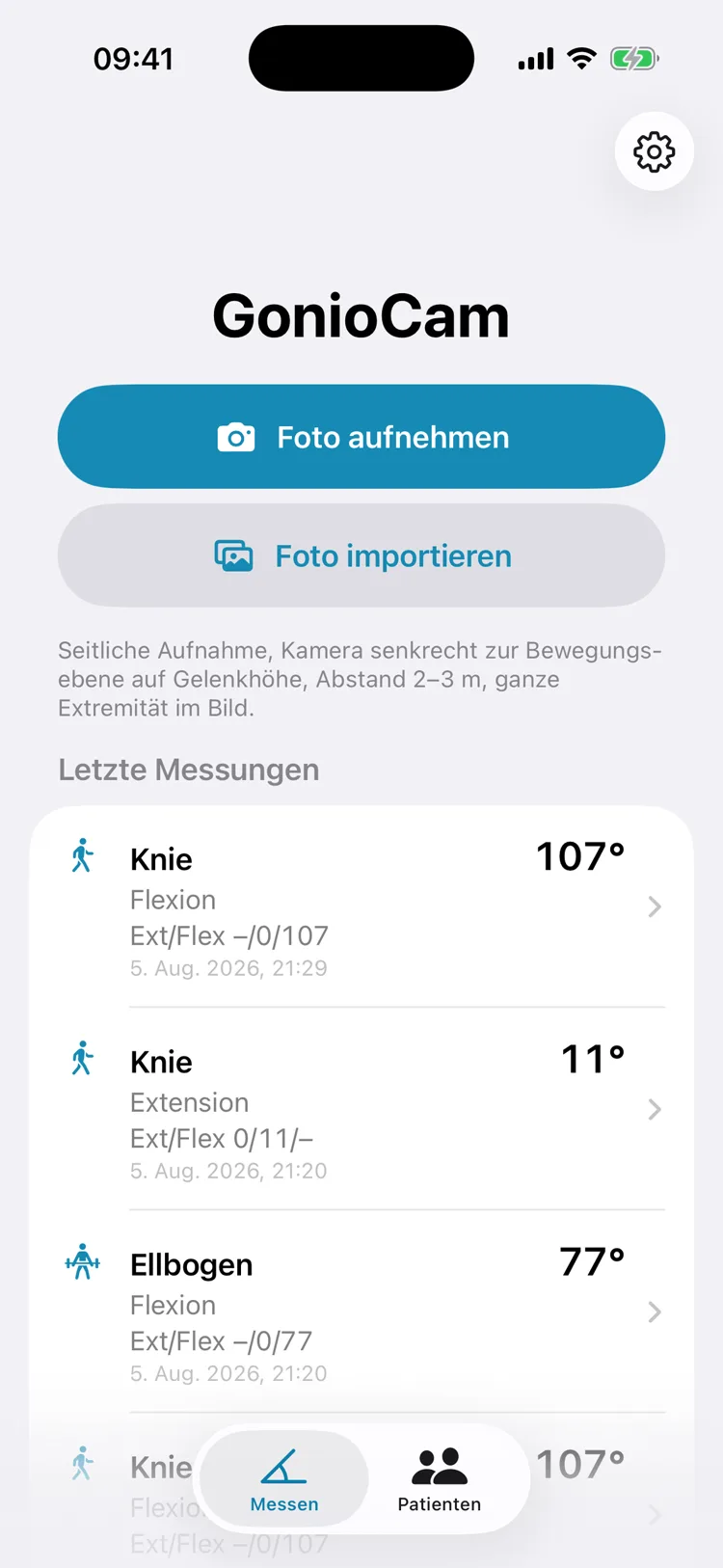
Two buttons, nothing more. You take the photo directly in the app, or pull an existing image from your library — including an older one or one someone else took.
Below that are the most recent measurements with value and notation. The photo guidance stays permanently on screen: shoot from the side, camera perpendicular to the plane of motion at joint height, 2 to 3 meters away, the whole limb in frame.
2
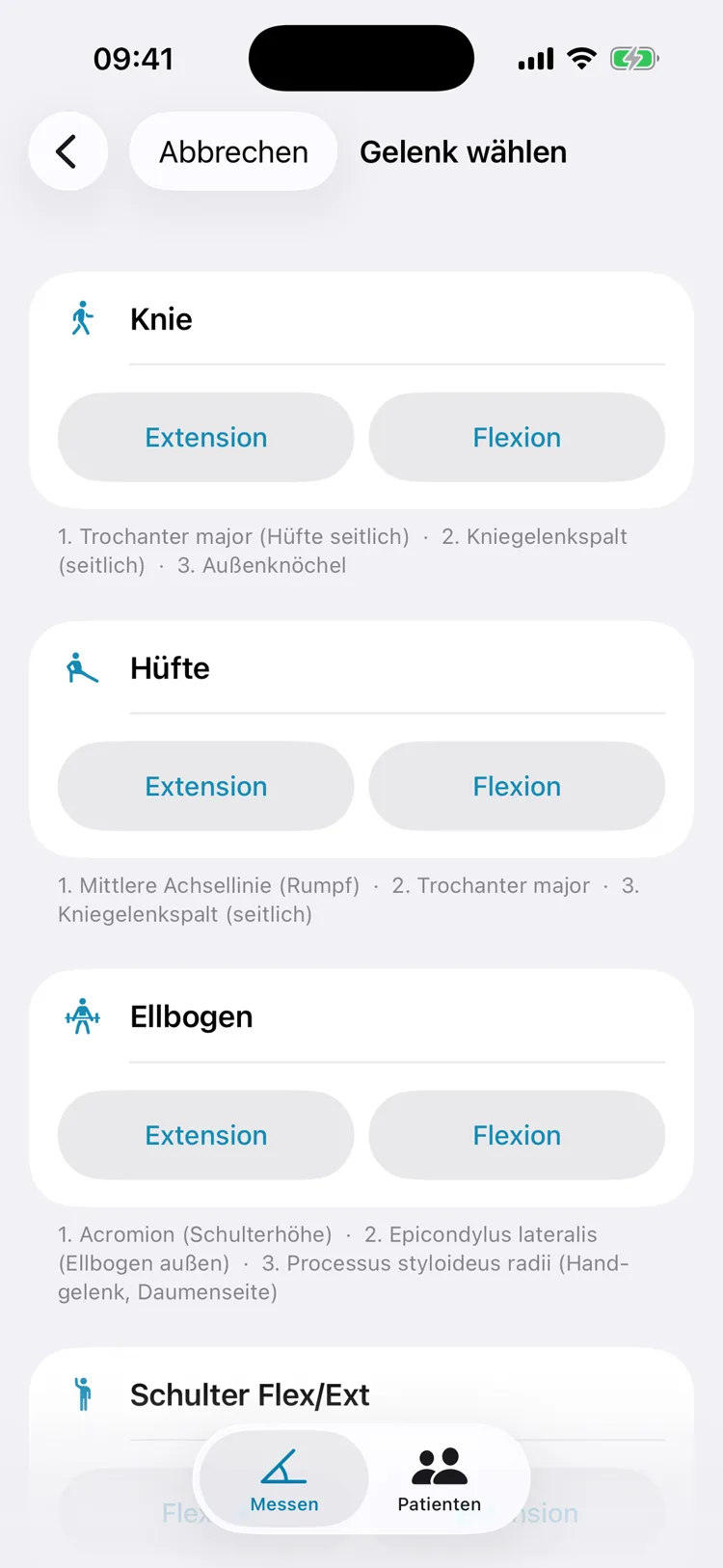
Choose the joint and direction of motion
Eight templates are available: knee, hip, elbow, shoulder for flexion and extension, shoulder for abduction and adduction, ankle, wrist, and a generic angle.
Under each card are the three anatomical landmarks in the order they should be tapped — for the knee, that's the greater trochanter, knee joint line, and lateral malleolus. The app doesn't explain these terms; it assumes professional knowledge.
3
Tap three points — proximal, joint, distal. As soon as you drag a placed marker with your finger, a magnifier at 2.5x zoom appears, showing what's under your fingertip. From the third point onward, the angle appears live in large type above the photo, along with the notation. The last point can be undone individually.
4
Pass the result along. The results screen shows the value and notation in large type, with the photo below it, angle marked and a value box. Through the system share sheet, this image goes straight into the chart or to the doctor. For joints with possible hyperextension, you choose here whether it's motion beyond neutral zero or a deficit.
5
With Pro: history and side comparison
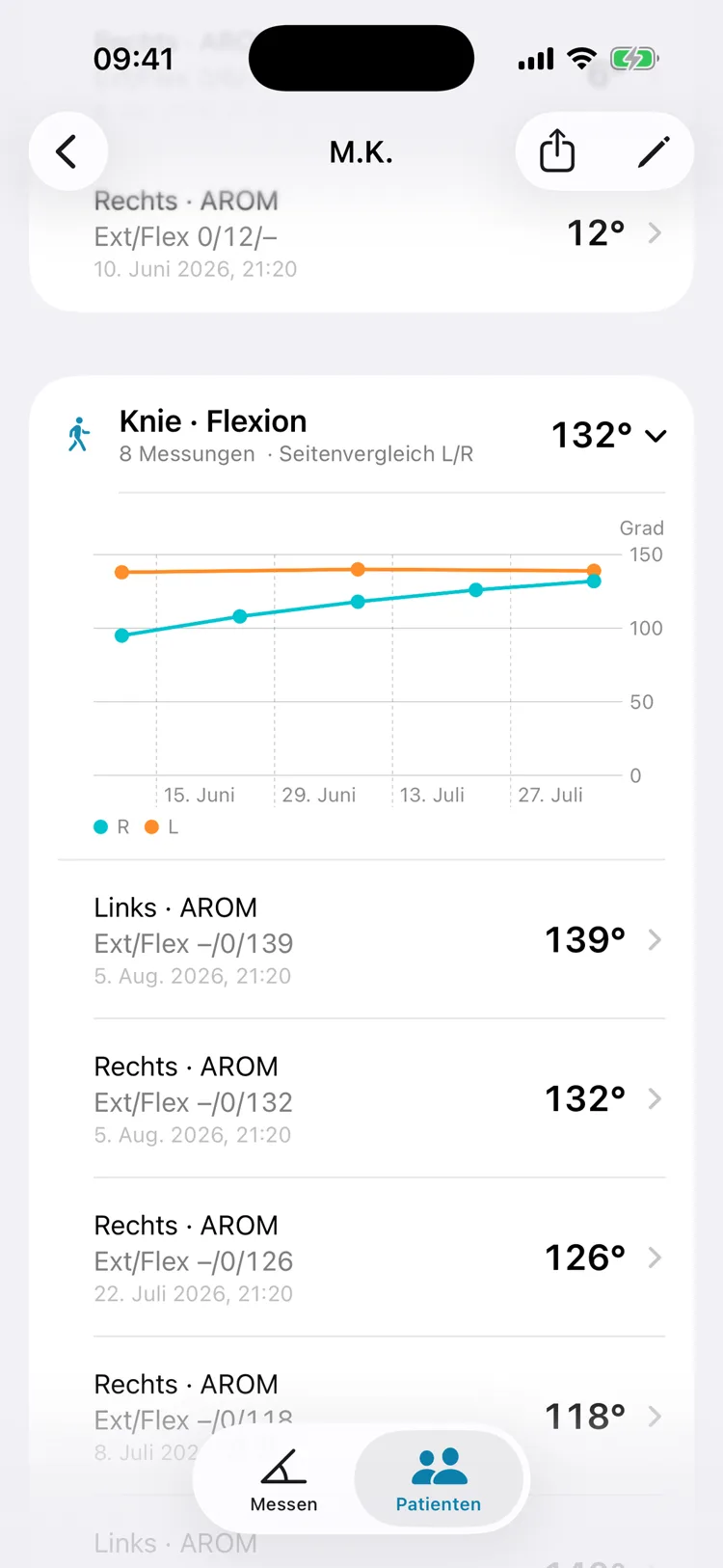
When you assign a measurement to a patient, you set the side (left, right or none) and the measurement type (AROM active, PROM passive) at the same time. In the patient detail view, that builds a history curve per joint and movement.
Left and right are drawn into the same chart — right in teal, left in orange — so the unaffected side sits alongside as a reference. A finger on the curve shows the date and values at that point.
The data in these images is sample data. "M.K." is a pseudonym, and the measurements come from a generated history.
What 0/10/90 means — the neutral zero method
The neutral zero method describes every joint with three numbers. The zero position sits in the middle, with the range of motion in each direction on either side. This exact notation is a well-known source of error, because the positions get filled in differently depending on whether the joint moves beyond the neutral position or never reaches it at all.
| Notation | Meaning |
|---|
| 5/0/130 | 5° of hyperextension, zero reached, 130° of flexion |
| 0/10/90 | Zero not reached — 10° extension deficit, 90° of flexion |
| –/0/107 | flexion only measured, 107° |
GonioCam does this translation for you. Because a photo can't geometrically distinguish hyperextension from an extension deficit — both produce the same included angle, just mirrored — the results screen for the knee, hip, elbow and wrist includes a deliberate choice between the two.
For the ankle, this choice doesn't apply, because the geometry there is unambiguous: the neutral position sits at a right angle, and whether the measured angle is above or below it settles the matter on its own.
Every joint has its own zero point
That's the actual core of the app, and the reason eight separate templates exist instead of one single angle measurement:
| Joint | Neutral zero is reached at |
|---|
| Knee, hip, elbow, wrist | a straight line (180°) |
| Ankle | a right angle (90°) |
| Shoulder | the arm at your side (0°) |
The displayed range-of-motion value is therefore something different from the raw measured angle, depending on the joint — for the knee, the deviation from 180°; for the ankle, the deviation from 90°; for the shoulder, the angle itself. The generic angle has no neutral zero reference and shows only the raw value.
How accurate is a photo measurement?
On the published research: established photo-goniometry apps have been reported to achieve very high test-retest reliability (intraclass correlation up to 0.99) and a standard error of measurement under 1°; inter-rater agreement was better than with a classic plastic goniometer. These figures refer to photo goniometry in general, not to GonioCam specifically.
GonioCam itself was tested against mathematically generated reference images with exactly known angles. In a model where all three points are shifted simultaneously in every direction, the result was:
| Condition | Maximum error |
|---|
| ±3 pixels of tap error (with magnifier) | 0.60° |
| ±6 pixels of tap error (without magnifier) | 1.20° |
| Joint small in the photo (short segments) | 1.97° |
Photo measurements depend on how the photo is taken: a side-on shot perpendicular to the plane of motion, camera at joint height, the whole limb in frame, and careful point placement are prerequisites for reliable values. An oblique angle distorts the result — the app can neither detect nor correct for that.
The practical takeaway from these numbers: accuracy stays within about two degrees, as long as the joint is large enough in the photo. That's why the guidance "whole limb in frame, 2 to 3 meters away" appears both on first launch and permanently on the home screen.
The full methodology, including the published research and GonioCam's own testing, can be read in the app — under Settings, Reference, "Methodology & Accuracy".
The automatic point suggestion — and its limits
For the knee, hip and elbow, the app can suggest the three points itself. Person detection runs entirely on the device; no image is ever sent to a server.
The suggestion is deliberately built to be cautious. It never runs on its own, only on tap. It only applies to three of the eight templates. It shows its own confidence level. And it requires explicit confirmation — nothing proceeds until "Checked, use this" is tapped.
If detection doesn't reach its threshold, there's no suggestion at all rather than a poor one. That happens more often than you'd think: detection needs the whole person in frame — a single leg or arm alone isn't enough. The suggestion is therefore a convenience feature; manual measurement remains the normal case.
Typical ranges of motion for reference
The app includes a reference table with typical ranges of motion for healthy adults according to the neutral zero method:
| Joint | Movement | Typical values |
|---|
| Knee | Ext/Flex | 5–10 / 0 / 120–150 |
| Hip | Ext/Flex | 10–15 / 0 / 120–140 |
| Elbow | Ext/Flex | 0–10 / 0 / 140–150 |
| Shoulder | Flex/Ext | 150–170 / 0 / 40 |
| Shoulder | Abd/Add | 160–180 / 0 / 20–40 |
| Ankle | DF/PF | 20–30 / 0 / 40–50 |
| Wrist | DF/PF | 35–60 / 0 / 50–60 |
Figures based on AAOS and neutral zero literature. This table is a pure reference resource on its own screen. The app doesn't compare measured values against it, doesn't classify them, and doesn't draw conclusions from them — that interpretation belongs to the treating professional.
Why this app
Photos never end up in your Photos library
Measurement photos you take are stored exclusively in the app's protected area — not in your private library, not in iCloud Photos, not in shared albums. A photo can only be passed on through the explicit share sheet. This is a hard rule built into the app's architecture, not a setting.
The photos stay on the device
The photos show patients. That's why they live in the app's protected area — separate from your private Photos library and with no detour through the network.
One-time purchase or subscription — your choice
The documentation features are available for a one-time €19.99 or by subscription. If you want to try them first, the yearly plan gives you the first month free; if you stay, buy once and you are done. If a subscription ends, recorded patients, histories and the PDF export stay readable — only adding new entries is locked.
The notation is fully implemented
Including the cases that experience shows get notated incorrectly: the deliberate choice between hyperextension and extension deficit, and for the ankle, the automatic derivation from the geometry.
The methodology is fully documented
How measurements are taken, what the published research shows, and under what conditions the accuracy figures apply — all of it can be read in the app, not just buried in fine print.
What it costs
Measuring is free forever, with no time limit: all eight joint templates, the magnifier, the automatic point suggestion, the neutral zero method, sharing individual photos, and storage for the last five measurements.
GonioCam Pro comes three ways: a one-time purchase of €19.99, a monthly subscription at €2.99, or a yearly subscription at €9.99 with the first month free. It adds: creating and assigning patients, side and measurement type per entry, history curves, the left-versus-right side comparison, a PDF report with selectable sections, printed in your country's paper size, and unlimited stored measurements.
Subscriptions renew automatically for the chosen period unless canceled at least 24 hours before it ends. Billing runs through your Apple account, and you can cancel any time in its settings. Apple's Terms of Use (EULA) apply.
There's no free trial period — instead, the measuring features simply stay free forever. The purchase can be restored on other devices with the same Apple ID.
The app runs on iPhone with iOS 17 or later and on iPad with iPadOS 17 or later; it can also be installed on Macs with Apple silicon, though it hasn't been verified for macOS. There's no Apple Watch version. It's available in seven languages: German, English, French, Spanish, Italian, Dutch and Brazilian Portuguese.
What this app deliberately doesn't do
GonioCam is a measurement and documentation tool (digital goniometer). Professional assessment is the responsibility of the treating practitioner.
GonioCam is not an approved or certified medical device. The app does not provide diagnoses, does not give therapy or treatment recommendations, and does not evaluate measured values.
Interpreting the measurement results, and all decisions that follow from them, is the sole responsibility of qualified professional staff. GonioCam must not be used as the sole basis for health-related decisions.
Accordingly, there are no traffic-light indicators, no score values, and no classification of measured values. That's by design: the moment an app evaluates measurements, it becomes something other than a goniometer.
Also missing on the technical side: measuring in a live camera view (a photo is always taken first), video or motion analysis, shoulder rotation measurements, templates for spine or fingers, multi-user operation, integration with practice management software, and CSV export.
Syncing between two devices doesn't happen currently. Your data stays on the one iPhone where it was recorded.
The app isn't intended for people expecting a remote assessment of their joint condition, or for anyone who needs an approved medical device — for example, for expert-opinion purposes requiring certification.
Your data stays on the device
Photos, measurement points, angles, pseudonyms and notes live exclusively in the app's protected area. None of it leaves the device unless you share it yourself.
Anonymous usage statistics from version 1.5. Via the service TelemetryDeck, the app reports which features are used — for example that a measurement was completed or a report was created. Photos, angles, measured values, patient names and notes are never transmitted. The statistics can be switched off in the app under Settings › Privacy, at the very bottom. That's why the App Store listing states "Usage Data" and "Purchases", both not linked to you.
Everything else only leaves the device when you trigger it yourself: a shared photo, a shared report, or a contact email. The latter includes the app version, iOS version and device model, but no measurement or patient data. All data can be viewed and deleted directly in the app; it disappears completely along with the app.
As a treating practitioner recording patient data, you are personally responsible for data protection compliance. The app explicitly recommends using pseudonyms or initials instead of real names in several places.
Use is at your own risk. To the extent permitted by law, liability for damages arising from use of the app — in particular from measurement deviations or their interpretation — is excluded. This does not affect liability for intent and gross negligence, or for damages arising from injury to life, body or health.
GonioCam has no affiliation with professional associations, health insurers, clinics or manufacturers of measuring instruments. Apple, iPhone and iOS are trademarks of Apple Inc.