Home·Apps·Heimblick
Heimblick combines every number around your home into one: what it costs you each month. Property tax, wastewater, insurance, energy and the payment on your mortgage come together in one place — and the app separates what's actually spent from what you'll own afterward.
What Your Home Costs Each Month
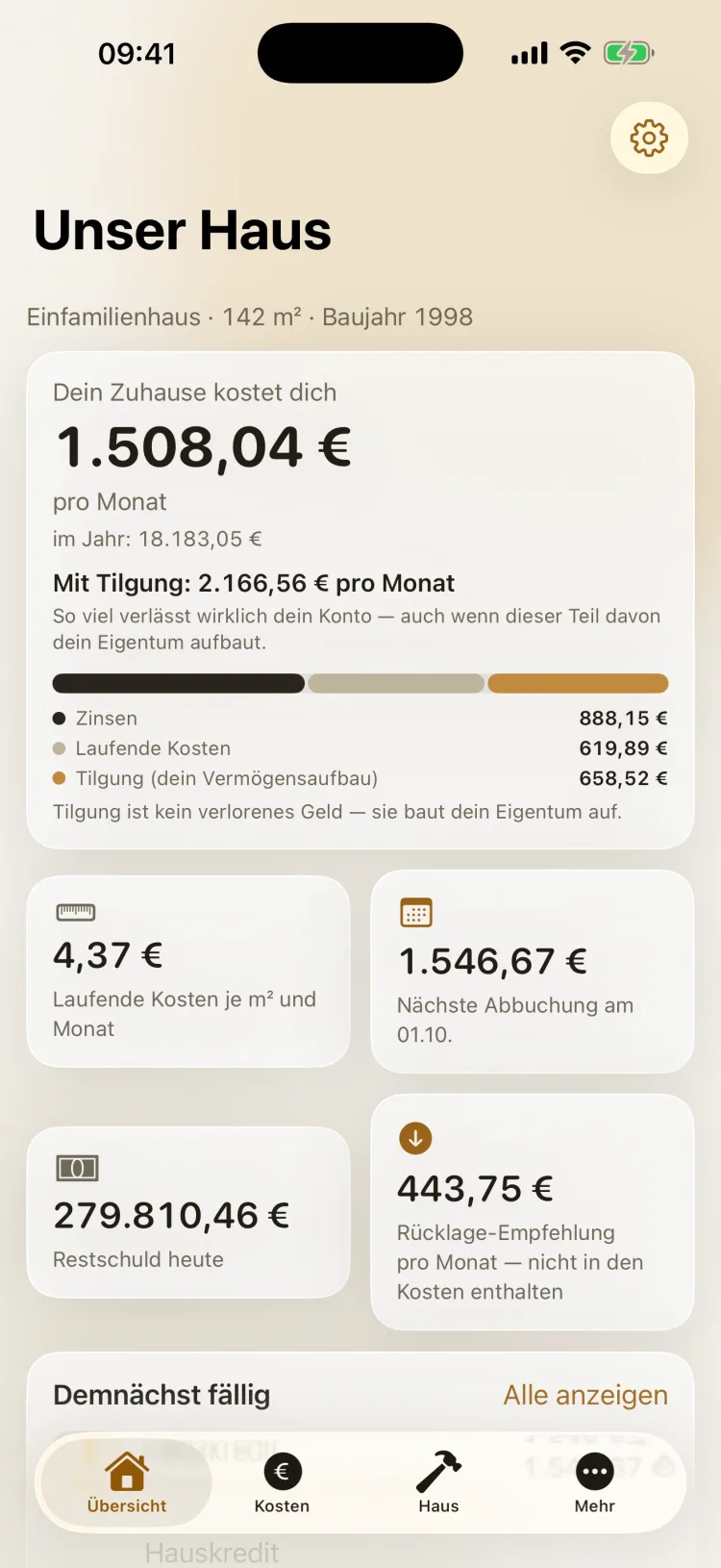
At the top of the overview is one sentence: Your home costs you — followed by the amount per month, with the yearly figure below. That number includes your running costs and the interest on your loan.
Principal repayment sits next to it, not inside it. It does leave your account every month, but it builds your equity. That's why Heimblick shows two figures: what your home costs you and what actually gets debited including repayment. A bar splits the total into interest, running costs and repayment.
| Item | Counts as |
|---|
| Running costs such as property tax, insurance, electricity and heating | Cost |
| Interest on the loan | Cost |
| Principal repayment | Equity |
| Recommended maintenance reserve | Note |
The recommended maintenance reserve deliberately doesn't count as a cost: it's an amount you should set aside, not a debit. Alongside, the overview shows the cost per square meter per month, the next debit, today's remaining balance and everything that's coming up soon.
For free, the overview shows the total of your running costs per month and year and the next debits. Loans, the split and the other tiles are part of Heimblick Plus.
How It Works
iPhone
1
One Number for Your Home
The overview answers the question that matters: what does your home cost you per month and per year? Below it, a bar splits the total into interest, running costs and repayment — with a note that repayment builds your equity.
The tiles show the cost per square meter, the next debit with its date, today's remaining balance and the recommended reserve. Below that is everything that's due soon.
iPhone
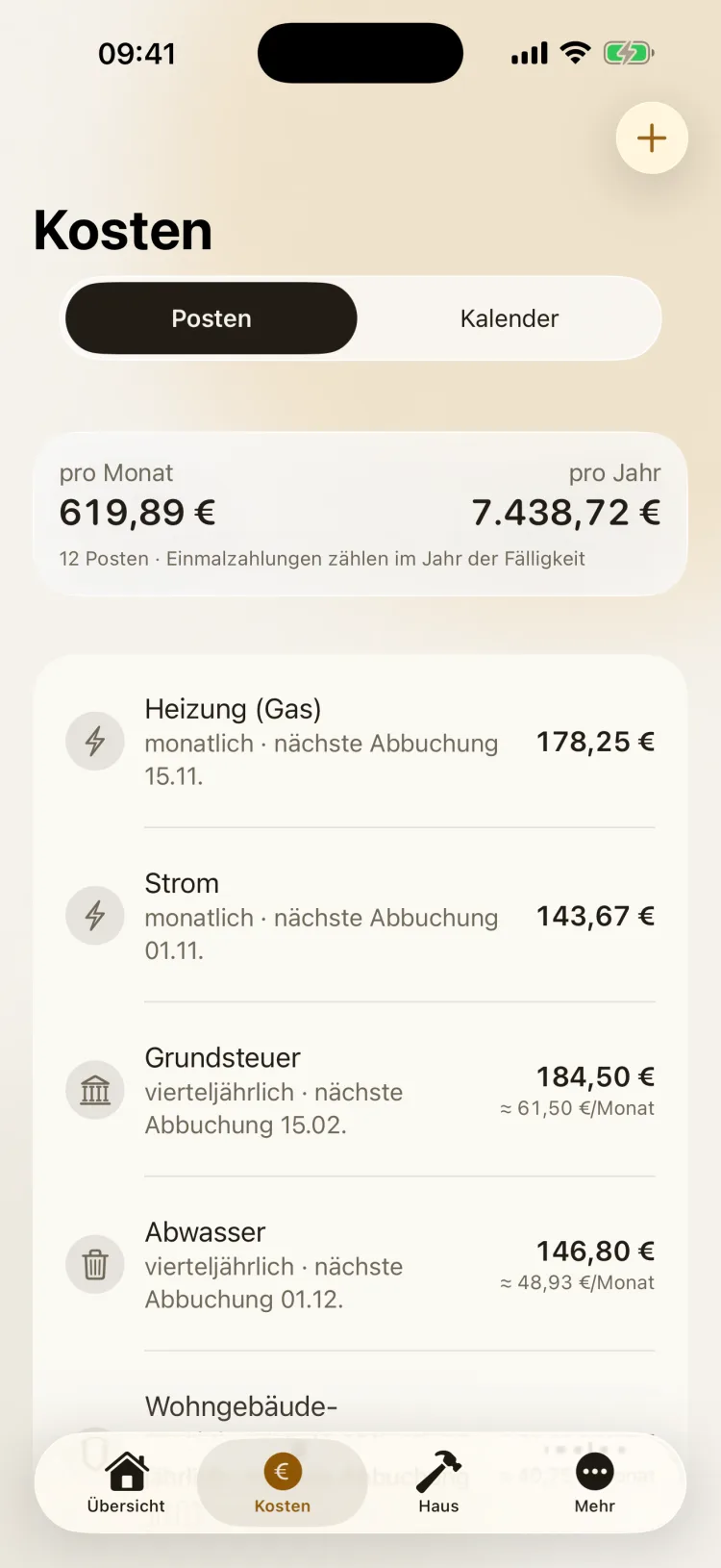
Each item has an amount, an interval and the next debit date — monthly, quarterly, semiannual, yearly or one-time. The totals per month and per year are at the top.
Quarterly and semiannual amounts are also converted to a monthly figure. That puts property tax right next to the electricity bill, directly comparable. The switch at the top takes you to the calendar.
iPhone
3
With Plus: Your Loan Over Time
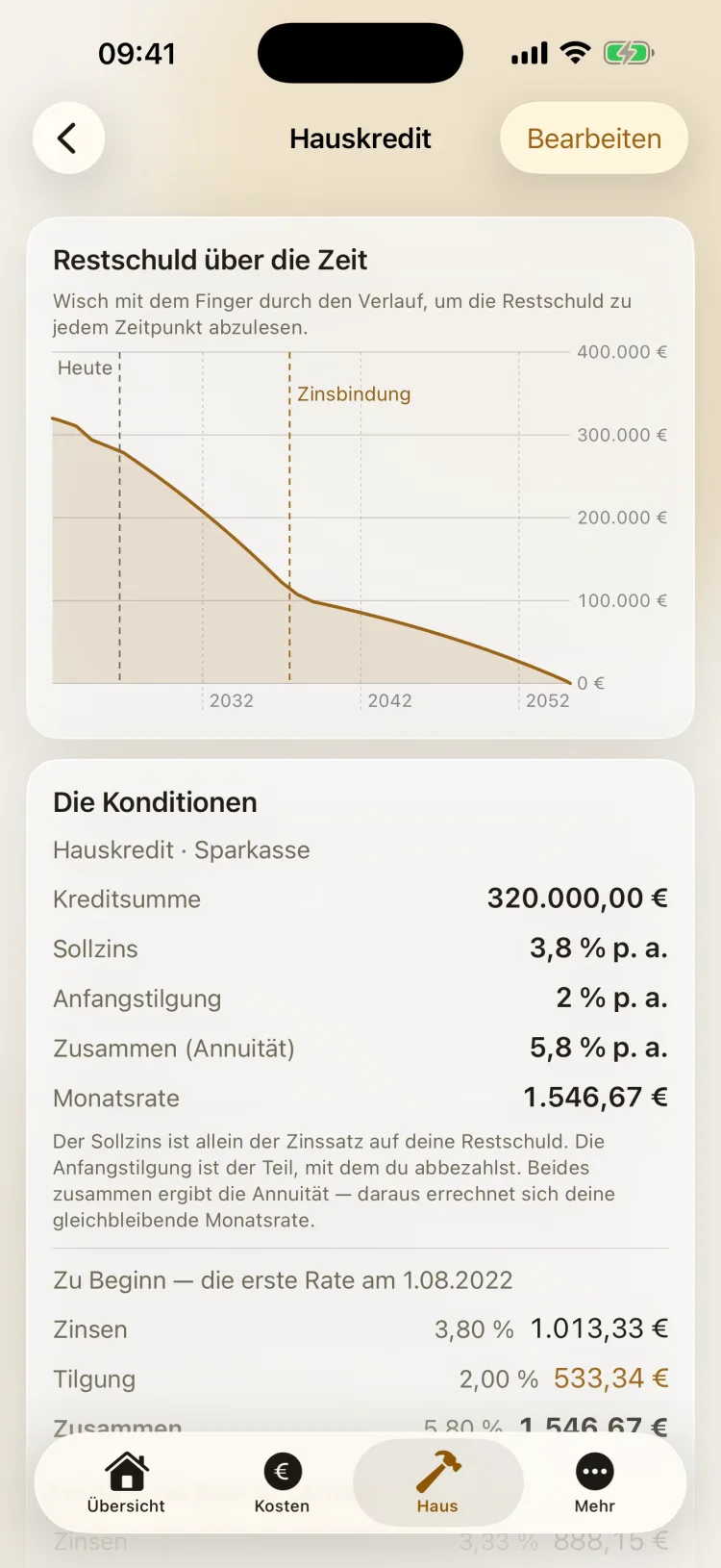
Enter the loan amount, interest rate and initial repayment rate — Heimblick calculates the monthly payment and explains how the annuity is made up. For the first payment, you see how much is interest and how much is repayment.
The curve shows the remaining balance over the full term, with one line for today and one for the end of the fixed-rate period. Run your finger along it to read the remaining balance at any point.
iPhone
4
Repairs and the Tradesperson Tax Credit
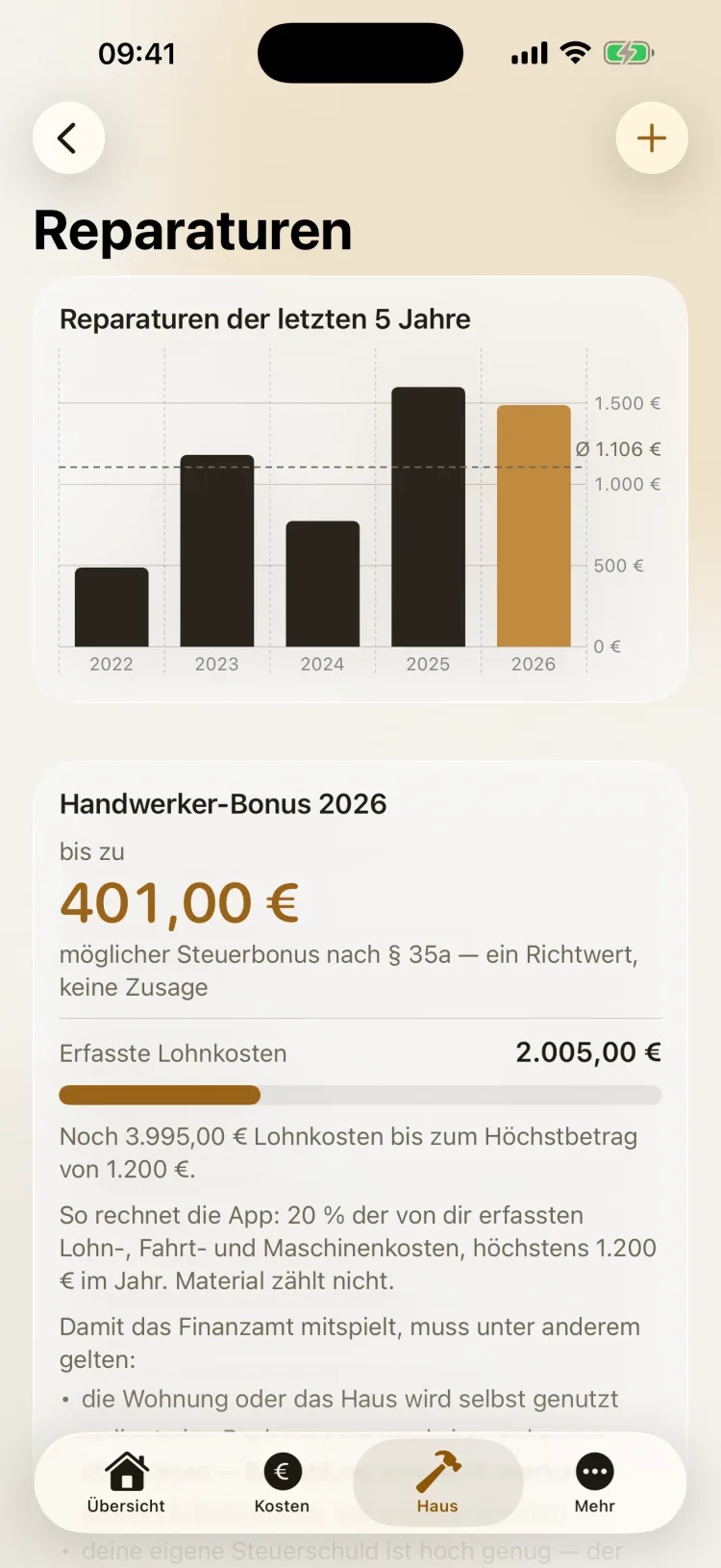
You enter repairs with date, amount and category, and optionally a photo or PDF of the invoice. With Plus, a chart puts the last few years side by side, with the average as a line.
If you note how much of it was labor, the app calculates a guideline figure for the tax credit under Section 35a of the German Income Tax Act — and explains how it calculates and what the tax office requires.
iPhone
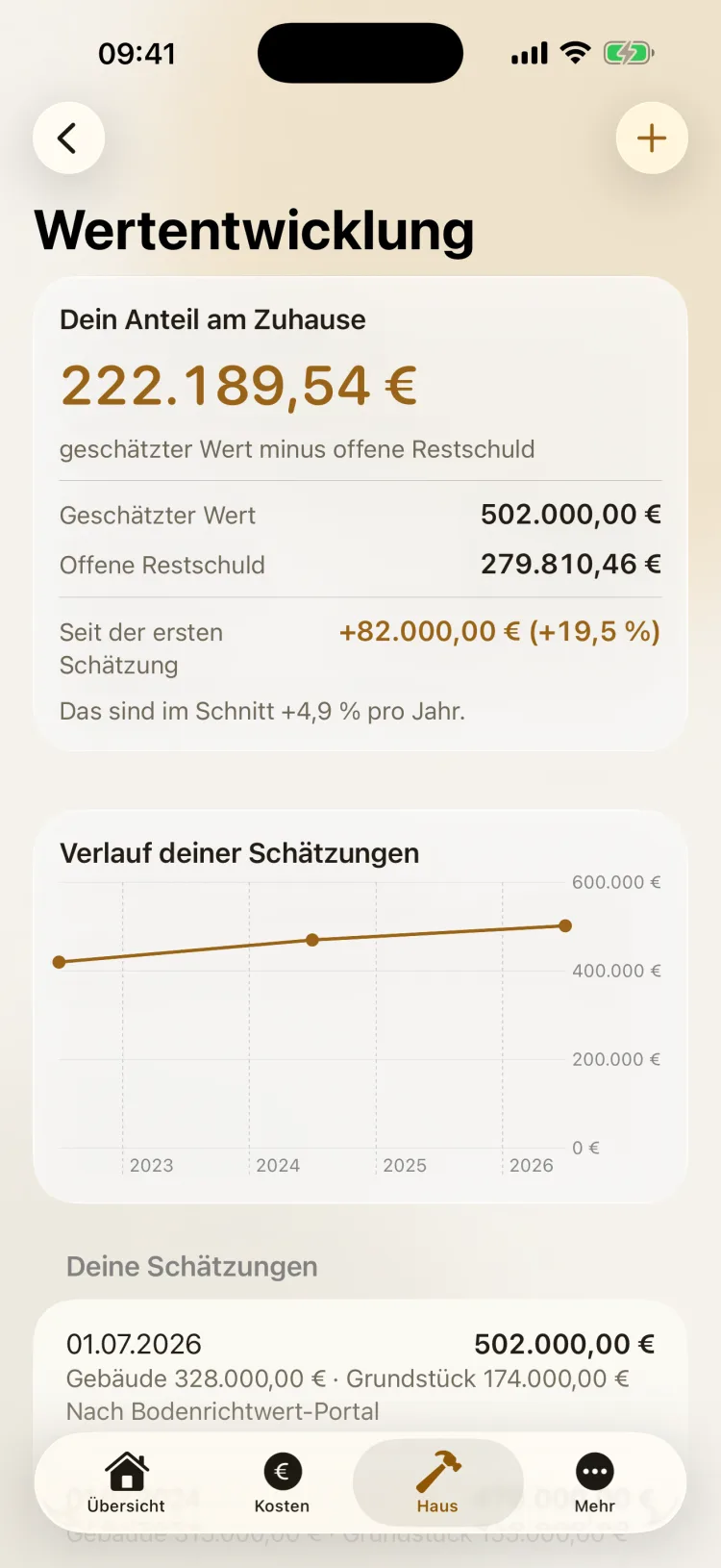
Enter what you think your home is worth — split into building and land, though one of the two is enough. Heimblick subtracts the remaining loan balance and shows your equity in your home.
Each new estimate adds to a history. The app works out how the value has changed since your first estimate, including the average per year.
The screenshots show sample data.
Running Costs and the Debit Calendar
To get started there are 33 templates, from property tax to chimney sweep, sorted into seven groups: taxes and fees, utilities and waste, energy, insurance, house and maintenance, living and other, and financing. For a condominium, the Hausgeld (condo fee) is included.
With Plus, the debit calendar shows what leaves your account over the next twelve months — in order, with how often each item is due per year and what it adds up to annually.
If a date falls on a weekend or a holiday, the app says so right there: “a Sunday — banks usually post on 11/02.” That way you see when the money actually goes out.
Your Financing, Worked Out
With Heimblick Plus, you work through one or more annuity loans: monthly payment, today's remaining balance and the complete amortization schedule, year by year.
- Extra repayments, one-time or every year. The remaining balance drops right away, and the following payments are calculated from the new balance.
- Fixed-rate period: the app shows when it ends and the remaining balance at that point.
- Play through follow-up financing: what happens when the fixed-rate period ends? You enter an assumed interest rate, and the amortization schedule continues with it from the end of the fixed-rate period.
- A timely reminder: if you like, Heimblick creates an appointment two years before the fixed-rate period ends — enough time to compare offers.
Calculations are done in cents with commercial rounding. The results are a calculation based on what you enter; your bank's documents are what count.
Repairs, Renovations, Receipts
Heimblick keeps repairs and renovations apart: repairs maintain your home, renovations add value and get their own total. You can attach receipts to every entry — take a photo of the invoice right away, pick an image from your photo library or attach a PDF.
Tradesperson tax credit under Section 35a
If you note how much of an invoice was labor, Heimblick calculates a guideline figure: 20% of the labor, travel and machine costs you've entered, up to €1,200 a year. Materials don't count. You reach the maximum at €6,000 in labor costs.
For the tax office to accept the credit, among other things: you live in the apartment or house yourself, there's an invoice, and it was paid by bank transfer. Also, the credit is deducted from your tax, not paid out — so your tax liability has to be high enough.
The tradesperson tax credit is a guideline, not a promise. Heimblick doesn't provide tax advice and doesn't review your individual case. Whether and to what extent the amount is accepted is decided by the tax office. If in doubt, talk to a tax advisor.
Your Equity in Your Home
Your equity in your home is what remains after subtracting the remaining balance. For this, Heimblick uses your own estimate of the value and subtracts the remaining loan balance. Each further estimate adds to a history. Value development is part of Heimblick Plus.
You'll find reference points in your state's official land value portal (BORIS), in listings for comparable properties on your street or in a valuation from your bank. A rough, rather cautious figure is enough.
If the remaining balance is still above your estimate, the app says so plainly — that's common with recent financing. Heimblick doesn't produce a formal valuation or an appraisal.
Reserve Fund and Buy or Rent
Recommended maintenance reserve using the Peters formula
The reserve and the comparison are part of Heimblick Plus. How much should you set aside for maintenance? Heimblick uses the Peters formula: over 80 years, a house costs about 1.5 times its construction cost in maintenance. That gives a yearly amount to save. An example:
| Calculation | Value |
|---|
| Construction cost per m² (preset, adjustable) | €2,000 |
| Living space | 120 m² |
| Reserve per year: €2,000 × 1.5 ÷ 80 × 120 m² | €4,500 |
| Reserve per month | €375 |
The recommendation appears as a separate note and isn't added to your monthly costs. For a condominium, the maintenance reserve is already part of the Hausgeld (condo fee); there, Heimblick shows the figure for comparison only.
Buy or rent
Enter what a comparable apartment in your area costs per square meter in net rent. Heimblick calculates the rent you save for your living space and compares it with your actual housing costs — running costs plus interest, without repayment. Repayment is shown alongside, as the equity you build each month.
It's a deliberately simple comparison: it leaves out appreciation, an alternative investment and future rent increases.
Appointments and Deadlines
Chimney sweep, heating maintenance, an expiring insurance policy or warranty: you create appointments, recurring if you like, and Heimblick reminds you in good time. The app schedules reminders on your device. Appointments with reminders are part of Heimblick Plus.
The end of the fixed-rate period belongs here too — its appointment takes one tap right in the amortization schedule.
What Sets This App Apart
Costs and equity, kept apart
Your loan payment isn't simply a “cost.” Heimblick separates interest from repayment and shows both: what's gone and what stays yours.
One home, covered completely
Condominium, townhouse, semi-detached house or single-family home: the app takes care of exactly one property — and covers it completely, from property tax to follow-up financing.
On the bank's calendar
Heimblick recognizes debits that fall on weekends and holidays and names the day banks usually post them.
Works with your numbers
All results are based on what you enter. Calculations are done in cents with commercial rounding.
Reminded in good time
Maintenance, insurance, fixed-rate period: anything with a deadline can get an appointment with a reminder.
What It Costs
Entering your data is free and stays free: setting up your home, as many cost items as you like with all templates, the overview with totals per month and year and the next debits, and repairs and renovations with receipts.
| Heimblick | Price |
|---|
| Download and enter data | €0 |
| Heimblick Plus, monthly subscription | €0.99 a month |
| Heimblick Plus, yearly subscription, first month free | €8.99 a year |
Plus unlocks the analyses: the full debit calendar for twelve months, financing with amortization schedule, extra repayments and follow-up financing, the split into costs and building equity, the cost per square meter, the repair chart, value development, the recommended maintenance reserve, the buy-or-rent comparison, appointments with reminders and export as JSON and CSV.
The subscription renews automatically for the chosen period unless you cancel at least 24 hours before it ends. You cancel in your Apple ID settings. When the subscription ends, everything you've entered stays saved; the Plus sections lock again until you subscribe to Plus again. Prices in the German App Store.
What This App Is Not For
It's not a budgeting app. Heimblick doesn't connect to any bank account and doesn't track transactions. It works through the fixed costs and the financing of your home, not your everyday spending.
It's for a home you live in yourself. Exactly one property per installation — the apartment or house you live in.
It doesn't replace advice. Heimblick isn't tax, financial or real estate advice and doesn't produce a formal valuation.
It's built for Germany. Templates and notes — property tax, the broadcasting fee, the tradesperson tax credit under Section 35a — follow the rules for homeownership in Germany.
The app runs on iPhone and iPad with iOS 17 or later and is in German.
Heimblick isn't tax, financial or real estate advice. All figures are based on your own input and are meant for orientation. Figures for the tradesperson tax credit are guidelines; whether and to what extent the tax office accepts them depends on your personal tax situation — if in doubt, discuss it with a tax advisor.
Apple, iPhone, iPad, iOS and App Store are trademarks of Apple Inc., registered in the U.S. and other countries. Heimblick is independently developed and has no connection to Apple Inc.