Home·Apps·PadelScore
Padel scores like tennis: 15, 30, 40, plus serve changes, change of ends and the golden point at 40-40. On the watch, one tap per point is all it takes — PadelScore handles everything else, right up to match point. And since the watch is already on your wrist, a complete workout is recorded along the way.
The padel scoreboard lives on your wrist
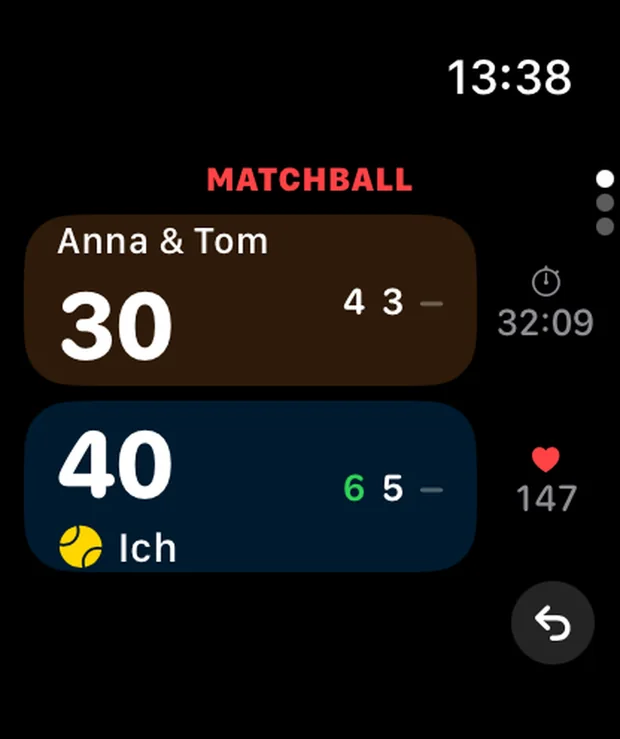
The whole padel scoreboard fits on the watch face: two colored panels, the opponent on top, your own team below. Whoever wins the rally gets a tap on their panel — that's all there is to do during play. The watch works out the score from there, keeps count of games and sets, and always knows who serves next.
The serve change after every game and the change of ends after every odd game happen automatically. The watch signals both with a short tap on your wrist, along with set point and match point. You don't have to look to know something's about to happen.
Before the match, you set how scoring works once: golden point as the padel standard, or advantage, or a simple running counter with no sets. Add the format, doubles or singles, and who serves first — three settings on one screen, done in under twenty seconds. After that, the iPhone can stay in your bag; it doesn't even need to be nearby.
What's left at the end is what nobody else writes down: which match went how, against whom, how long it lasted, at what heart rate. Over a season, that becomes a record — and in an Americano with six, eight or ten players, the watch keeps the standings, instead of someone adding it all up on the back of a receipt.
How it works
1
One tap per point — that's it
The main screen shows two colored panels: the opponent on top, your own team below. A tap on a panel scores a point for that team. The small ball marks who's serving; match time and heart rate run alongside on the right.
The watch works out the rest: score, sets, serve changes, change of ends. What's at stake appears in plain text up top — set point, match point — and the watch taps your wrist briefly at exactly those moments. Tapped the wrong panel? The undo button sits in the bottom right.
2
Just one question at the end
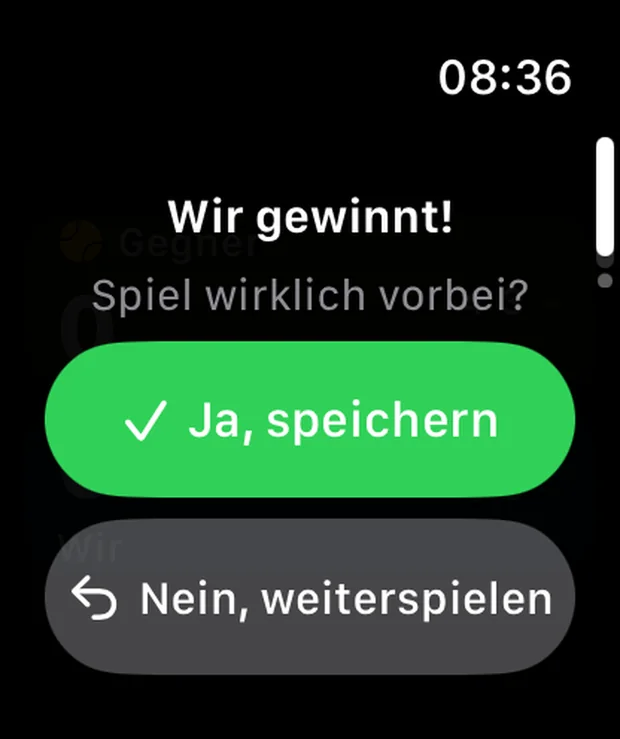
On the last point, the watch vibrates and asks once: Match really over? "Yes, save" closes out the match and sends it to your iPhone. "No, keep playing" simply undoes that last point — in case the ball was actually out.
If the question goes unanswered because everyone's already shaking hands, the app saves automatically after two minutes. There's no save button to forget.
iPhone
3
It's already on your iPhone
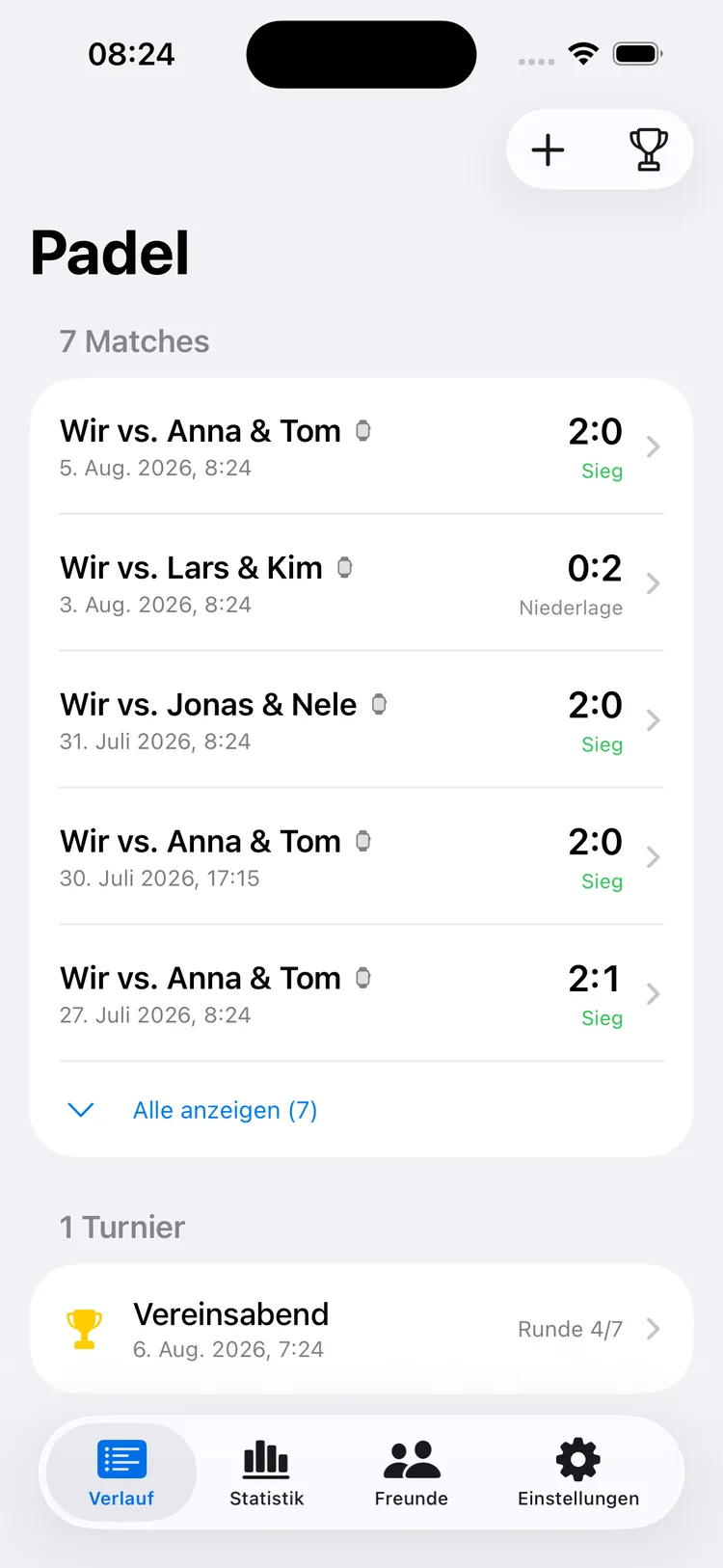
By the time you're in the locker room, the match is on your iPhone. It sits right at the top of your history — with a watch icon, the set score, and "Win" or "Loss" in green.
Tournaments sit below in their own list, with a running one showing the standings after each round. Four tabs are all the app needs on the phone: history, statistics, friends, settings.
iPhone
4
What actually happened in the match
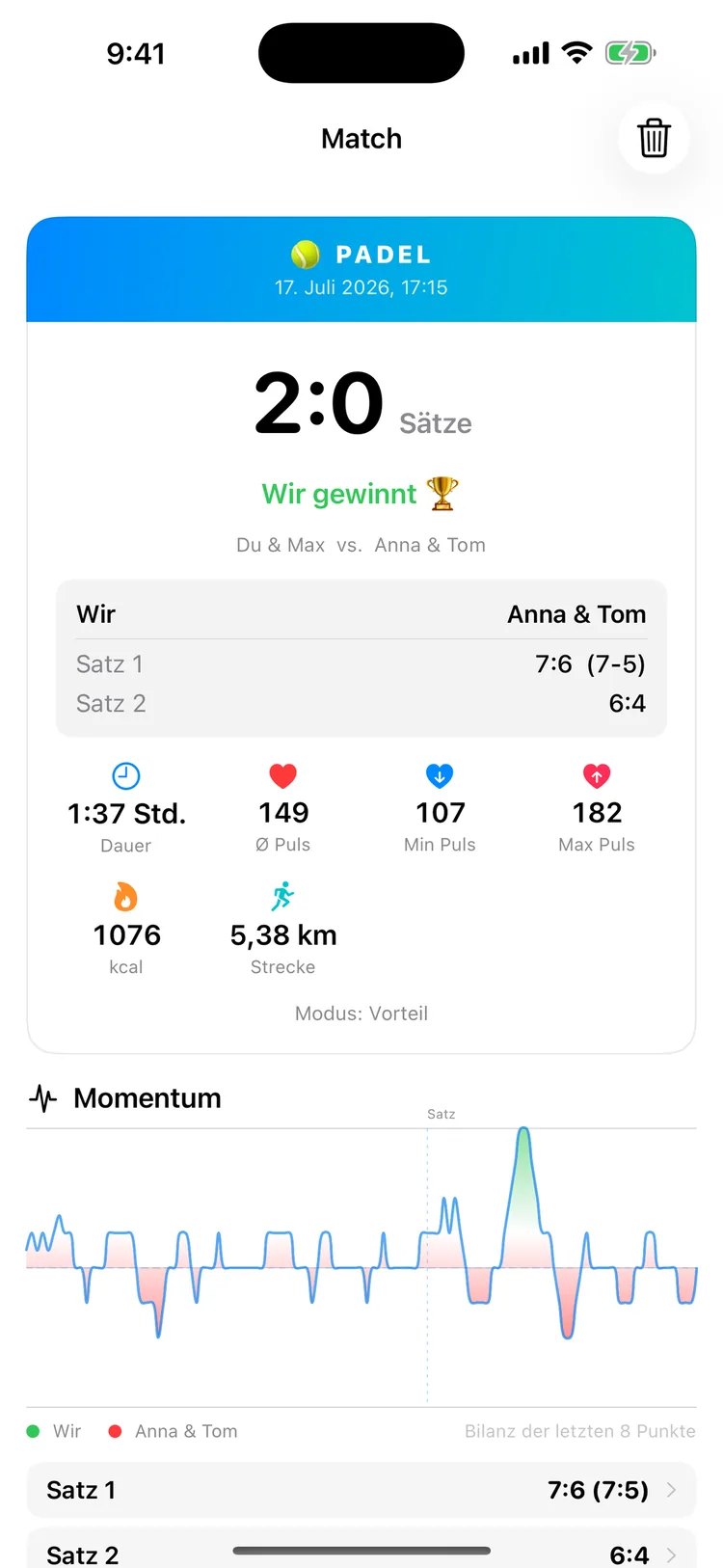
The detail view shows each set individually, plus duration, average, lowest and highest heart rate, calories and distance covered — all from the watch's sensors.
Below it runs the momentum chart: the point-by-point flow as a curve. That's where you see, in black and white, exactly where the match turned — and that the tiebreak in the first set was closer than it felt.
iPhone
5
Over a season, it becomes a curve
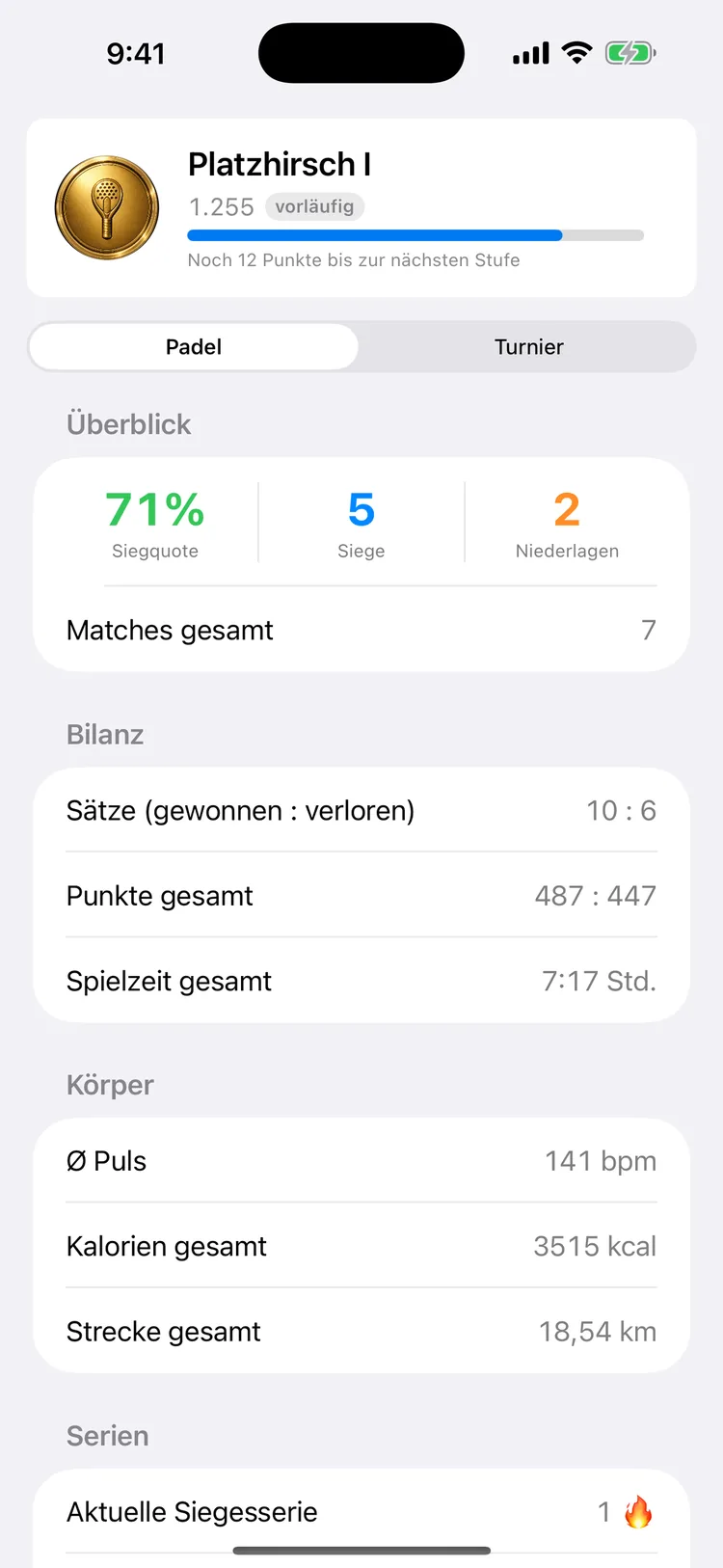
Rank and skill rating sit at the top, with a bar showing progress to the next tier. Below that, the overview: win rate, wins, losses, total matches.
The record shows sets won and lost, total points and overall playing time; the "Body" section shows average heart rate, calories and distance across all matches. Tournaments and matches are counted separately — you switch between them at the top.
The names and numbers in these images come from test matches and are not real player data.
The three scoring modes
Which scoring mode applies is set on the watch before the match — three settings on one screen, done in under twenty seconds.
- Golden point — at 40-40, a single point decides it. This is the padel standard and the default setting.
- Advantage — at 40-40, play continues with deuce and advantage, won by a two-point margin. The tennis-style variant some groups prefer.
- Simple counter — just a running point count, with no games, sets or tiebreaks. For anything that doesn't follow the rulebook: practice games, "first to 21", kids' matches.
You also choose whether it's 2 against 2 or 1 against 1, and who serves first. In singles, the watch also shows the serving side and signals the change of ends.
Sets, tiebreaks and the four formats
A set runs to six games. At 6-6, a tiebreak to 7 follows, won by a two-point margin. The deciding set can optionally be played as a champions tiebreak to 10 — handy when your court time runs out in ten minutes.
| Format | Meaning |
|---|
| 1 set | one set, done |
| Best of 3 (default) | first to two sets wins |
| 3 sets | all three are played |
| Best of 5 | first to three sets wins |
The "3 sets" mode is the odd one out: it plays all three sets to completion, even if one team already leads 2-0 — whoever has more sets at the end wins. This mode exists because some leagues and booking platforms require all three sets when entering a result. Without it, you'd be one field short when filling in the score there.
Americano and Mexicano: club night sorted
Tournament mode is built for the night when more people show up than fit on one court. Two formats are available: Americano, with a fixed rotation where everyone plays with everyone once — and Mexicano, where pairings follow the current standings, so evenly matched players face each other.
| Setting | Options |
|---|
| Players | 4 to 12 |
| Rounds | 3, 5, 7, 9 or 12 |
| Points per round | 16, 21, 24 or 32 |
A round's points are split between both teams: with 24 points and a score of 16-8, each player on the winning team is credited 16 points, each on the losing team gets 8. The app adds this up across all rounds and keeps the standings — including for whoever is sitting out. Who's resting is shown right on the screen; nobody gets forgotten anymore.
On the watch, players start out as 1 to 12
Typing names on a watch would be a pain, so the app skips it. In a tournament, players are simply numbered 1 to 12 at first — on the court, everyone already knows whose turn it is. Matching them to real names happens later on the iPhone, optionally, and can be corrected afterward. If the creator corrects it, the correction carries through to everyone who received the tournament. Anyone who receives a shared tournament picks out which player they were.
A note of honesty: the watch is deliberately built to manage just one court. A single wrist can't track two matches running at once, and a tournament organizer coordinating three courts won't be well served by this app.
Heart rate, calories and your workout in Apple Health
Every match is a workout at the same time. The watch records heart rate, calories, distance and duration and writes them to Apple Health — even in the free version. Only displaying these values inside the app is part of PRO; they land in Health either way.
It's logged as an indoor tennis workout. That's not an oversight: Apple Health has no dedicated padel type, and tennis is the category closest to the actual effort. Those two hours show up in your rings, your workout overview and everything else that reads from Health — instead of as an anonymous "other".
PadelScore is not a medical device. The values shown are for informational purposes during sport and are not intended for medical use. They do not replace professional medical advice, diagnosis or treatment.
Skill rating: seven ranks, three tiers
Your rated matches produce a skill rating based on the Elo principle from chess. Everyone starts at 1200. A win against a much stronger team earns a lot; a loss against one costs little.
| Rank | From |
|---|
| Rookie | 600 |
| Riser | 800 |
| Regular | 1000 |
| Court King | 1200 |
| Wall Pro | 1400 |
| Match Point | 1600 |
| Legend | 1800 |
Every rank has three tiers of 67 points each — so "Court King" becomes "Court King II" before the next rank arrives. That keeps the progress bar moving even while you're stuck between two ranks.
In your first ten rated matches, the value moves faster so it settles in quickly; after that, it calms down. From three wins in a row, a 50 percent bonus applies per further win, capped at plus 150 percent — and this bonus only affects points gained, never points lost. The margin of victory counts too, though dampened: a 6-0 weighs more than a nail-biter, but not twice as much.
The leaderboard: which matches count
A leaderboard is only as good as its rules. Otherwise, whoever sits on the couch tapping their own panel thirty times wins. So a match only counts toward the ranking if all three conditions are met:
- at least 15 minutes long
- at least 20 points played
- an average of at least 15 seconds per point
On top of that, at most six matches per calendar day count; if there are more, the most recent ones are used. Abandoned matches, manually logged matches and test data never count.
Shared matches count if it's clear which side you were on — via friend code or your name in the lineup. So the same evening doesn't land in the ranking twice because two people shared the same match, the app excludes overlaps by time. A match recovered from Apple Health skips the point thresholds — there, you enter sets, not individual rallies, and the threshold wouldn't apply.
Tournaments count differently
A tournament only feeds into your skill rating if it was played and finished on the watch, at least 3 rounds were planned, it lasted at least 15 minutes, an average of at least 6 seconds per point passed — and you identified yourself with "that's me". Tournaments don't factor into the leaderboard's Matches and Wins columns at all; those are match-only figures.
Your own statistics are more generous
In your personal statistics, everything you've played counts — including short and manually logged matches. Abandoned matches count toward match count, playing time, heart rate, calories, distance, sets and points, but not toward win rate, record, streaks, or the "With Partners" and "Against" tables. An abandoned match shouldn't save or ruin your win rate.
Friends, friend codes and shared matches
Friends are found via an eight-character code you read out to each other courtside. It uses 32 characters without I, L, O and U, since those regularly get mixed up with 1, 0 and V. A friendship is mutual: one side sends a request, the other confirms it.
A match can be passed on two ways. As text or a ready-made result card in image format — that works with anyone, over any messenger. Or as an actual shared match to selected friends: then it lands in their history and statistics too, from their point of view. Whoever stood on the other side of the net sees the same match as a loss. This runs over private iCloud, not a server operated by the app maker.
If you allow it, a notification alerts you to incoming matches, friend requests and later changes to a tournament assignment.
A finished match is safe
A match that's been played to the end is saved. Three independent safeguards make sure of that:
- The result comes first. It's saved and sent before anything else happens. Heart rate and calories follow immediately after.
- It stays on the watch until the iPhone has explicitly confirmed receipt — for up to 30 days. Once both devices are back together, it transfers over on its own.
- And the route via Apple Health. If the app finds a workout with no matching game — it looks back 30 days for this — it offers to add the result afterward. Duration, heart rate and calories are already filled in; you just add the score.
That's why there's no save button to forget: the one question at the end of the match is enough, and even that answers itself after two minutes. A result here isn't a display value you can just reload — it's the record of two hours that will never happen quite the same way again.
Follow Along, Key Moments, Positions
Watch live (beta): if a teammate is keeping score on their watch, you can follow the score — on your watch or on your iPhone, with points, serve and who is standing where. After the game, the match lands in your app together with your own workout.
The key moments appear in the analysis: break points, golden points, the first point of a game and the first game after changing ends. They are part of PRO.
And if you like, the watch shows who plays right and who plays left — from your point of view, so you can quickly check mid-game that everyone is in position. You choose your own player name, and names with umlauts and accents work reliably.
What sets this app apart
The watch is the main device
A complete match runs on your wrist — the iPhone can stay in your bag, in the car, or at home. The transfer to your phone happens later, directly between the two devices, with no network and no detour through a cloud.
Every scoring style you'll find on a padel court
Golden point and advantage, tiebreak to 7 and champions tiebreak to 10, doubles and singles, four set formats. Even the mode that plays out all three sets, because some leagues require it for entering results.
Club night, covered
Americano and Mexicano for four to twelve players, with automatic rotation, a rest indicator and live standings. Matching real names happens later, at your own pace, on the iPhone.
Every finished match is safe
The result is saved before anything else happens, stays on the watch until the iPhone confirms receipt, and can even be recovered from the Apple Health workout. Three safeguards for a record that only happens once.
Every match counts toward your fitness, too
Heart rate, calories, distance and duration land as a full workout in Apple Health — in your rings, your workout overview and everything else that reads from it.
What it costs
The app's core features are free: scoring on the watch in golden-point doubles over best of 3, the full workout in Apple Health, transfer to the iPhone, the last five entries in your history, the statistics overview, friends and leaderboard, receiving shared matches, iCloud backup and logging matches after the fact.
| PadelScore PRO | Price |
|---|
| Monthly | €0.99 |
| Yearly — with a free 1-month trial | €7.99 |
| One-time, forever | €19.99 |
PRO unlocks: the display of heart rate, calories and distance; the full statistics with record, streaks, "With Partners" and "Against" — separately for matches and tournaments; every match detail including the point-by-point flow, momentum chart and key moments; your complete history instead of just the last five; every scoring mode and format (advantage, tiebreak, 3 sets, best of 1/3/5); singles with serve and change-of-ends display; tournament mode with Americano and Mexicano; sharing as text or image; and the live view on your iPhone while a match is running.
Both subscriptions renew automatically until you cancel. Billing runs through the App Store; cancel in your Apple Account settings, at least 24 hours before the current period ends. The one-time purchase does not renew. Purchases can be restored on additional devices with the same Apple ID via "Restore Purchases"; an active PRO automatically covers both iPhone and watch together. Apple's standard terms of use apply.
What this app is not for
It doesn't detect anything on its own. There's no shot detection, no video analysis and no motion tracking. Points are entered by tapping the watch — the app counts what a person enters.
It's not a padel portal. No court booking, no player matching, no social network, no chat. No training plans or coaching tips either.
It's not for tournament organizers running multiple courts, or for clubs managing a season-long league. The watch is deliberately built for one court.
Without an Apple Watch, there's not much left. Matches can be logged by hand, but the core of the app is scoring on your wrist.
There are no widgets, no Shortcuts, and no CSV or PDF data export. PadelScore is built as an iPhone-only app and requires iOS 17, watchOS 10 on the watch; on iPad it only runs in iPhone compatibility mode, and there's no Mac version. The interface is translated into nine languages: German, English, Spanish, French, Italian, Dutch, Portuguese (Brazil and Portugal) and Swedish. Dark mode follows the system; there's no separate switch for it.
PadelScore is a scoring aid and does not replace official competition scoring. The rule descriptions in the app are an implementation of common padel rules, not an official ruling. The app has no affiliation with padel federations, leagues, clubs or booking platforms.
Your data stays with you
Scores, match and tournament history, and all health values are created and stay on your iPhone and watch. Health data lives in Apple Health and never leaves the device. Your history is additionally backed up to your private iCloud — the app maker has no access to it there.
You decide what friends see of you: your profile with a display name you choose, your friend code and your leaderboard numbers — and the matches you explicitly share with them. Both run over your private iCloud, not a server operated by the app maker.
Full details are in the Privacy Policy; along with the Legal Notice.
Apple, Apple Watch, iPhone, iPad, iOS, watchOS, Apple Health, iCloud and App Store are trademarks of Apple Inc., registered in the U.S. and other countries.