Home·Apps·Wettergram
Weather apps answer the question "what will it be like tomorrow." Travel sites answer "what does it cost." In between sits the question nobody answers: where and when. Wettergram is built for both — the view out the window and the view of the map.
Tell it when you want to go — it finds the rest
Pick a month, tap what you're in the mood for: Beach & Swimming, Soak Up Sun, Mild & Pleasant, City Trip, Snow & Cold or Just Warm. Wettergram then searches 211 destinations and presents them ranked — the best one first.
It's not just temperature that counts. The rating also factors in rainy days, hours of sunshine and rainfall, and for coastal destinations, the sea temperature too. That's the difference you'd otherwise only notice once you're at the beach: a May with 25°C air sounds like swimming weather — with 18°C water, it isn't.
Every destination has its own profile with climate through the year: temperature, rainfall and hours of sunshine month by month, plus the best time to visit, the weather on the ground and the current local time. Up to three places can be compared side by side.
Anyone planning around school holidays finds them right alongside: 31 European countries, all 16 German states, including bridge days. Two regions can be overlaid to find a shared week — and for every holiday period, the app suggests matching family destinations.
And for today? The app opens on the weather at your location: current temperature, 14-day forecast, rain radar, air quality and the position of the sun.
How it works
iPhone
1
Open it — and it's already there
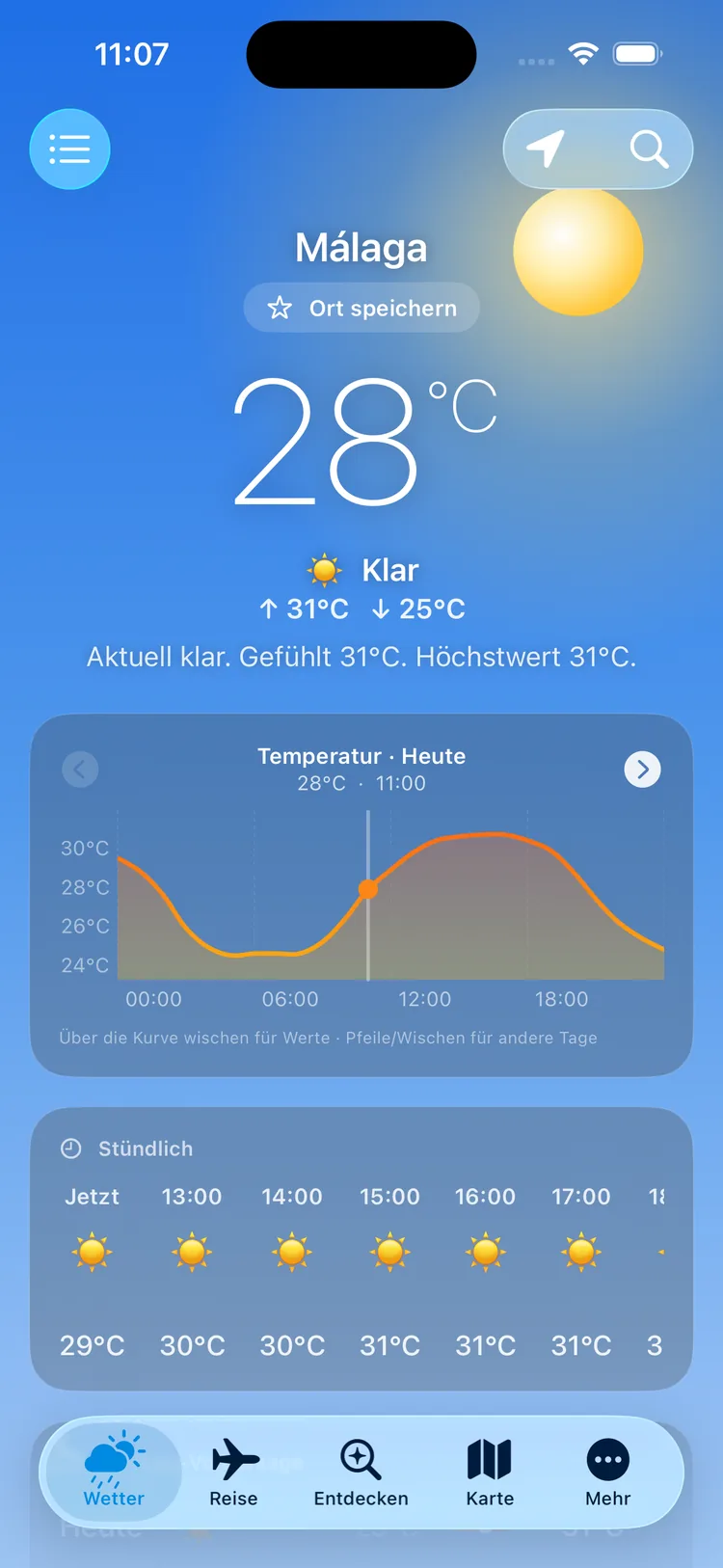
No onboarding, no registration, no welcome screen. The app opens straight onto the weather, at your location or the last place you picked.
Temperature and conditions in words up top, then a plain-language sentence below ("Clear right now. Feels like 31°C."), then the daily chart — swipe across the curve to read the value at any hour. The background paints the sky to match the weather and time of day.
iPhone
2
Tell it what you're after
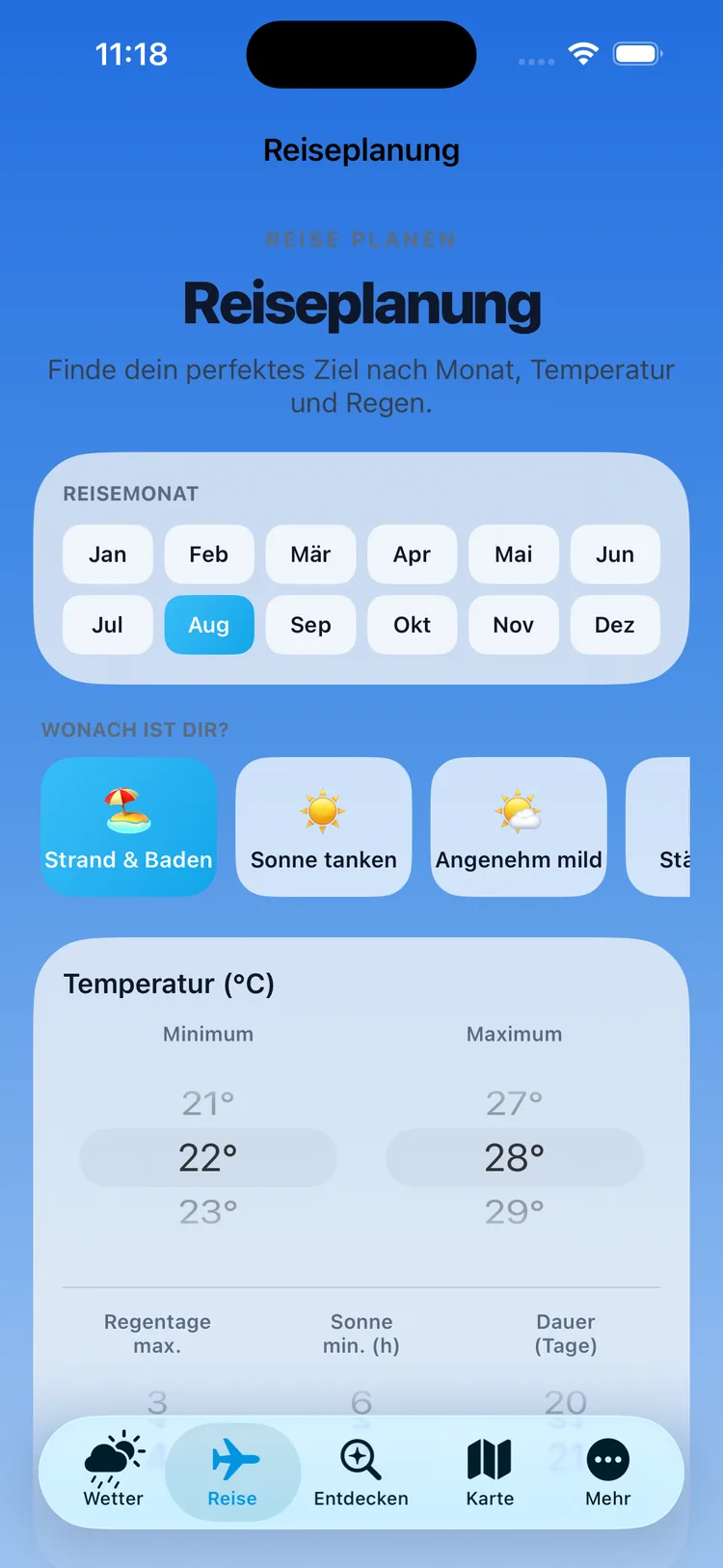
In the trip planner, you first pick a month — or several. Below that sit six presets that set every value with one tap: Beach & Swimming, Soak Up Sun, Mild & Pleasant, City Trip, Snow & Cold, Just Warm.
If you want it more precise, you dial in the numbers yourself: temperature range, a maximum number of rainy days, a minimum number of sunshine hours, and trip length.
iPhone
3
A ranking, not just a list
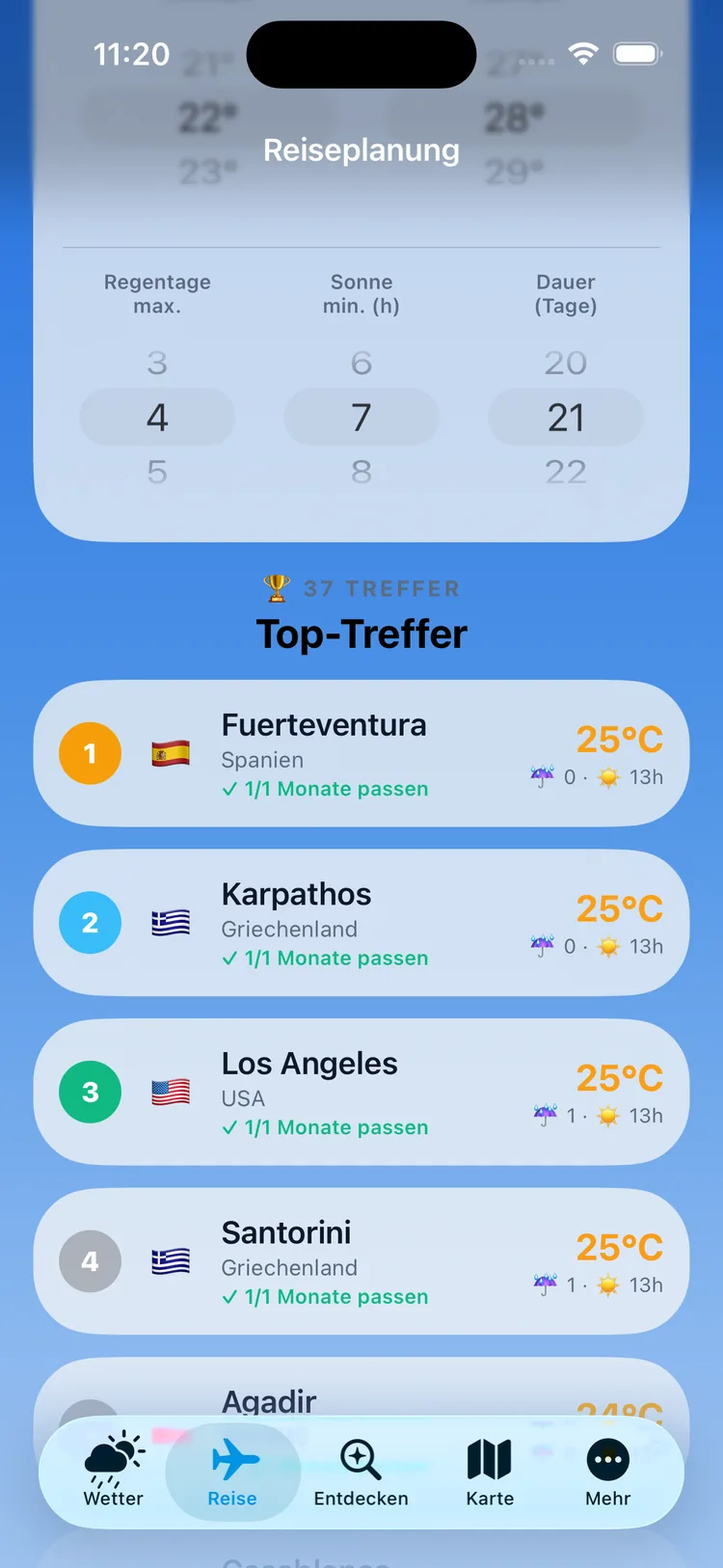
Matches are numbered and ranked by fit — not alphabetically, and not paid placement. Average temperature, rainy days and hours of sunshine sit right next to every destination. How many destinations match at all is shown above the list; it shows the best ones first.
The note "✓ 1/1 months match" matters more than it looks: if you've checked three travel months, it tells you instantly whether a destination fits all three or just one.
iPhone
4
One destination, the whole year round
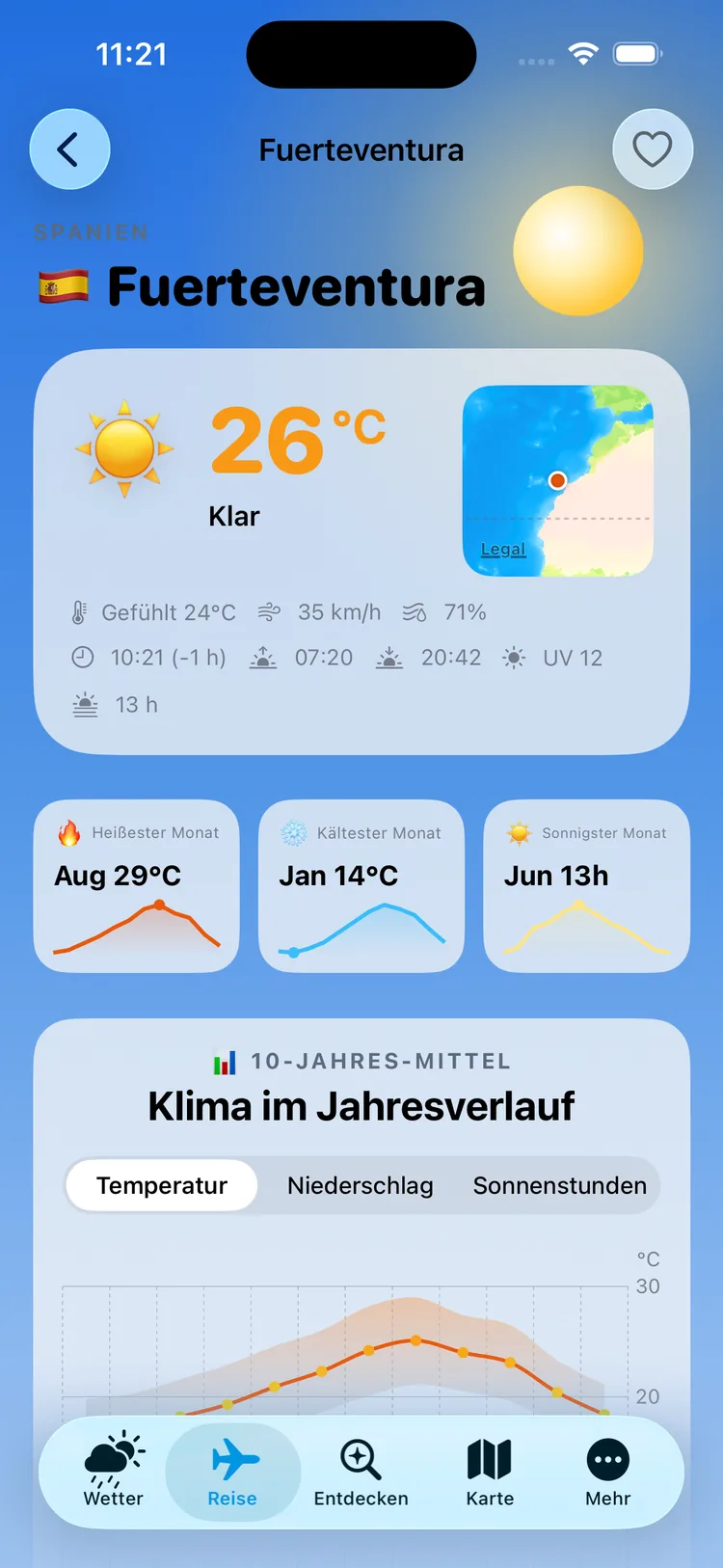
The weather on the ground sits at the top, plus the current local time with time difference, sunrise and sunset, UV level and day length. Then three tiles: hottest, coldest, sunniest month.
Below that, "Climate Through the Year," switchable between temperature, rainfall and hours of sunshine — and further down, the best time to visit, the month-by-month table and similar destinations. Tap the heart to save a destination.
iPhone
5
Or just see where it's warm
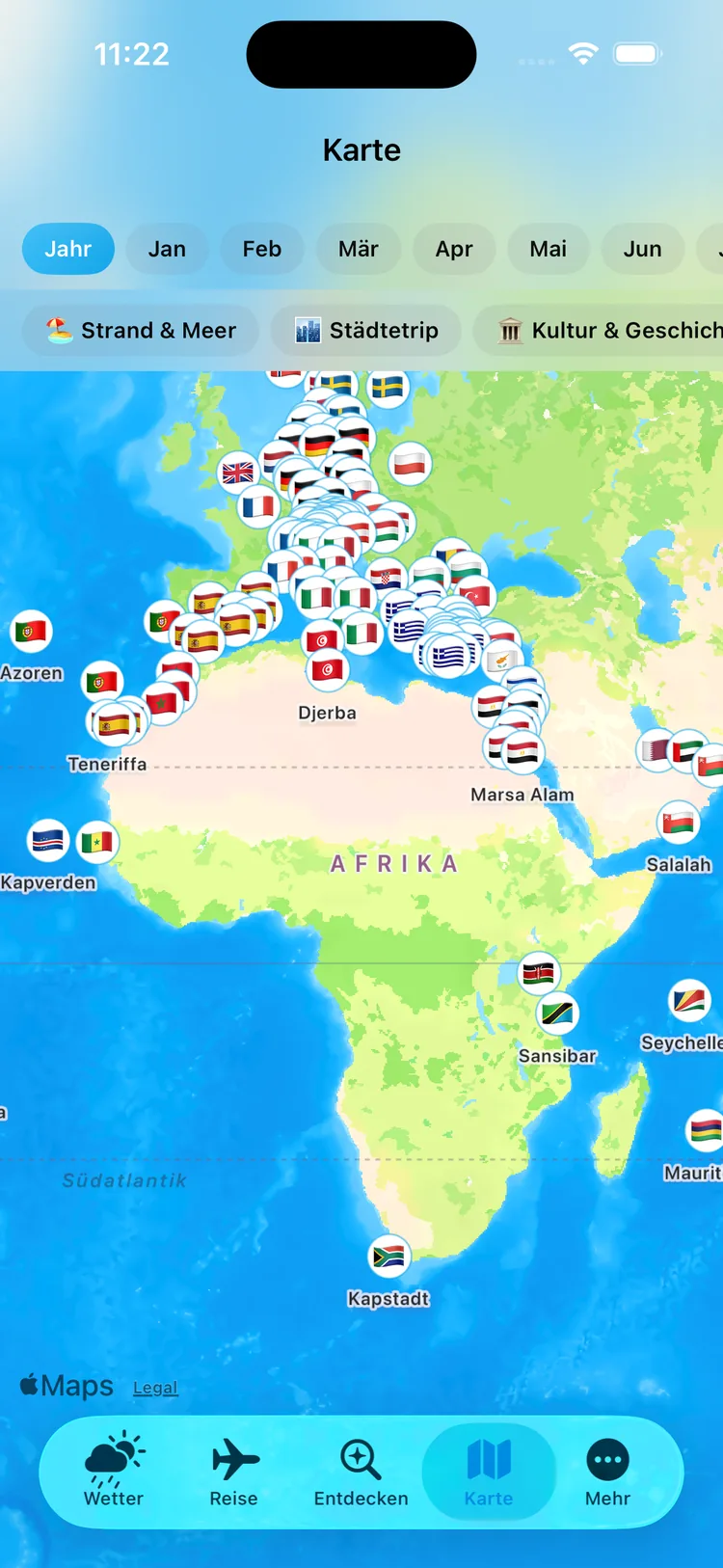
If you don't have any criteria yet, go to the map. All 211 destinations sit on it as pins; up top you choose a month or the whole year.
The filters below sort by type of trip: Beach & Sea, City Trip, Culture & History, Lakes & Nature, Mountains & Snow, Desert & Heat. Tapping a pin opens a quick card, from where you go on to the full profile.
The images show real data from the app — the location is set to Málaga. No personal information appears in them; the app doesn't collect any.
Your daily weather
The travel side is what makes it special, but the app gets opened every day for the weather — and it's built accordingly. The forecast reaches out to 14 days, and you decide how many of them are shown: anywhere from 1 to 14.
Twelve metrics each have their own daily chart you can tap and swipe across to read the value at any hour:
- Temperature and feels-like temperature
- Rain probability as a percentage and rainfall amount
- Wind, cloud cover, visibility and air pressure
- UV index, humidity and minutes of sunshine
- Air quality on a six-level color scale from "good" to "extremely poor"
On top of that, an hour-by-hour timeline, a 48-hour meteogram, an interactive sun position chart with sunrise, sunset and day length, plus a live rain and cloud radar you can expand to full screen.
Multiple locations can be saved, reordered by dragging, and deleted again. And in settings there's a daily reminder at a time you choose freely — off by default, with no detour through a server: the notification is generated on the device.
The trip planner: how wishes become a ranking
The six presets aren't just moods — they set concrete numbers. Here they are:
| Preset | Temperature · Rainy Days · Sun |
|---|
| Beach & Swimming | 22–28 °C · 2 · 7 h |
| Soak Up Sun | 22–32 °C · 2 · 8 h |
| Mild & Pleasant | 16–24 °C · 3 · 5 h |
| City Trip | 12–26 °C · 4 · 4 h |
| Snow & Cold | −12 to 4 °C · 8 · 0 h |
| Just Warm | 22–42 °C · 5 · 0 h |
Rainy days apply per ten travel days and are scaled to your chosen trip length: "at most 2" becomes at most 6 for a month-long trip. It's the more honest approach — two rainy days is a lot for a weekend and not much for four weeks.
Trip length limits the distance
A weekend in the Maldives doesn't make sense, so the app won't suggest it. Your chosen trip length determines how far away destinations are allowed to be:
| Trip Length | Radius |
|---|
| up to 4 days | 1,800 km |
| up to 7 days | 4,500 km |
| up to 11 days | 9,000 km |
| longer | worldwide |
Distances are calculated from the country matching your app language setting, not from Germany by default — with the Dutch interface, that's Amsterdam; with Polish, Warsaw. Frankfurt, London, Amsterdam, Stockholm, Oslo, Copenhagen, Helsinki, Paris and Warsaw are built in.
How ranking works
For every month you select, the app checks whether temperature, rainy days, hours of sunshine and rainfall fall within your target range. Matching months get a score made of two parts: a temperature score that peaks in the middle of your target range and tapers off toward the edges, and a rain score that drops with every rainy day. The two are averaged.
And then comes the decisive step: this score is multiplied by the share of matching months. A destination that only fits one of three selected months slides down the ranking as a result — even if it's perfect in that one month.
Climate isn't weather — and average isn't high
Two mix-ups cause most of the disappointment in trip planning, and both are quickly explained.
Weather is what happens over the next few days — a forecast, with all its uncertainty. Climate is the average across many years for a place and month. Climate tells you that Fuerteventura is usually warm and dry in August. Whether it rains on your specific travel day, it doesn't say and can't say.
The second mix-up concerns temperature. Climate tables often quote the mean temperature — the average of day and night. People planning a trip usually want to know the daytime high. In many places, the two differ by six to eight degrees. That's why the app bases its best-time-to-visit rules on highs, and lists all three values openly in every profile.
Climate values are long-term averages, not a forecast for a specific travel day. A place with an average of two rainy days in July can still have three of them during your week.
To be upfront about it: not every value is measured. Hours of sunshine and rainfall amounts are partly calculated for the planner's scoring — derived from latitude, month and rainy days. That's a reasoned approximation, not a measurement, and should be read as one.
Best time to visit: five rules for five kinds of destination
"Best time to visit" means something completely different for a ski resort than for an island. That's why the app doesn't use one rule, but five — depending on the type of destination:
| Destination Type | What Counts as the Best Time |
|---|
| Beach destination | 24–33 °C, at most 8 rainy days, plus water from 22 °C at the coast |
| Ski resort | at most 3 °C — otherwise December to March by default |
| Lake | from 22 °C ("best swimming time") |
| Desert & heat | 18–30 °C ("most pleasant time to visit") |
| City trip | 15–27 °C, at most 12 rainy days |
The water condition for beach destinations is where these rules differ from a plain climate table: a May with 25 degrees of air drops out of the recommendation if the sea is still at 18 degrees. That's exactly the mistake you'd otherwise only catch once you're at the beach.
For four ski resorts, there are also glacier notes with concrete dates — Sölden (skiing from mid-September, closed in high summer), Zermatt (Klein Matterhorn at 3,883 m, year-round), Val d'Isère (Pissaillas glacier, late November to early May) and St. Moritz (Diavolezza, late November to mid-April).
211 destinations: what's in the database
The climate database covers 211 places in 72 countries, each with 12 monthly records of eight values: high, low and mean temperature, rainfall, rainy days, hours of sunshine, wind and — for the 129 destinations with coastal access — sea temperature. The app reports these values as a 10-year average.
Every destination also comes with the best time to visit, a climate summary written in full sentences, similar destinations and a save list. For 114 of the 211 places, there's additionally an editorial write-up, available in all nine languages.
This data ships inside the app's download, not on a server. That has two effects: the trip planner works even without internet, and no request goes out when someone searches destinations — there's simply nowhere that could see it happening.
Regional notes explain what a value refers to — main island town, island group, lakeshore, state or capital. Family suggestions follow a diversity rule: at most two destinations per country, so half the list doesn't end up from a single country. Two destinations are excluded from recommendations for safety reasons.
World map and city comparison
All destinations sit on the map as pins. Up top you choose a month or the whole year, below that you filter by trip type: Beach & Sea, City Trip, Culture & History, Lakes & Nature, Mountains & Snow, Desert & Heat. This is the starting point for anyone without criteria yet who just wants to see what's out there.
Anyone who already has a shortlist uses the comparison: up to three places side by side, with a year-round climate chart — switchable between temperature, sun, rain and wind — a comparison table and a month-by-month overview. Exactly what you'd otherwise keep three tabs open for.
School holidays: 31 countries and the overlap trick
The holiday planner covers 31 European countries, all 16 German states. It shows holiday periods plus bridge days and adjoining weekends — the days that turn three vacation days into nine days off.
The unusual feature is comparing two regions: you pick two states or two countries and get the overlapping periods shown. It's built for two friend families from different states, or for family members living apart who need to find a shared week. For every holiday period, the app suggests matching family destinations — turning the two separate searches from the first section into one.
The weather time machine, back to 1940
This feature doesn't help with planning at all. It answers the question of what the weather was like on a specific day in the past — your own birthday, your wedding day, that summer everyone remembers as "it was hotter back then."
You can pull up either a month of a given year or a precise date range, back to 1940. The app doesn't just show the values — it puts them in context: warmer or cooler than usual, more or less sun, more or fewer rainy days — each measured against the long-term average, with a daily chart.
What sets this app apart
Weather and travel work together
Not just "what will it be like tomorrow," but also "where and when." From a destination profile, you go straight to the weather on the ground, and from the weather straight into the planner.
Climate data lives on your device
All 211 destinations ship inside the download. The trip planner works even without internet as a result — on a plane, in a vacation rental with bad reception, anywhere.
Sea temperature included
For the 129 coastal destinations, sea temperature is right there in the profile, month by month. It's the number that decides "swimming" versus "wading in up to the ankles" — and the one most climate tables leave out.
The holiday calendar is built in
School holidays for 31 countries including bridge days, with the overlap comparison for two regions. That turns two separate searches into one.
The background reacts to the weather
The app paints a sky that follows the weather and time of day — sun, clouds, rain, snow, stars at night. Anyone with "Reduce Motion" turned on in iOS settings gets a still version.
What it costs
The app is completely free. The full feature set is available from the first second — every feature on this page is included.
It's funded through referral links to travel providers, shown in the destination profiles and clearly marked as advertising there. If you book through one, the app's developer receives a commission. Nothing changes about the price for you: it's the same whether you use the link or book directly with the provider.
What this app is not for
It's not a booking platform. There are no prices, no availability and no flight times — only climate data. Booking links open the browser at the relevant provider; booking, paying and canceling all happen there and only there.
It's not a specialist weather tool. For sailors, pilots or agriculture, the essentials are missing: no severe weather warnings, no model comparisons and no wind forecasts on nautical charts. It's also only of limited use for "will it rain here in fifteen minutes?" — the radar is an embedded window, not its own minute-by-minute forecast.
Climate profiles only exist for the 211 selected destinations. You can get current weather for almost any place through search, but your own hometown typically won't have a climate profile.
The holiday planner covers Europe — outside these 31 countries, there are no holiday dates.
There are also no widgets, no Shortcuts, no Apple Watch app, no share feature and no data export. The app runs on iPhone and iPad from iOS 17, with its own layout on iPad where comparison, time machine and holidays get their own tabs. There's no Mac version.
One quirk worth knowing: the place names in the destination database are German. Even in the Polish or Finnish version, destinations are called "Teneriffa," "Mallorca," "Kreta" — only the interface and the editorial write-ups are translated.
Wettergram is not an official weather service and does not issue severe weather warnings. The app displays third-party data and measures nothing itself; it does not replace an official warning. Displayed values such as UV index and air quality are for informational purposes and are not health recommendations. The app has no affiliation with government agencies, weather services or tourism organizations.
Your data stays on the device
Settings, saved locations and saved destinations live exclusively on your device. Your location is only used there to make the weather request — it isn't stored. If you don't grant location access, you simply search for places instead and use everything else unchanged.
The app queries weather services directly, with no detour through its own server. Full details are in the Privacy Policy.
Weather data from Open-Meteo (including its climate archive since 1940), school holidays from OpenHolidaysAPI, live radar from Windy, maps from Apple. Apple, iPhone, iPad, iOS and App Store are trademarks of Apple Inc., registered in the U.S. and other countries. All other trademarks mentioned belong to their respective owners; no affiliation or partnership with them exists.