Home·Apps·BalkonWatt
"Pays for itself in three to four years" — that's true for a south-facing balcony with no neighboring building in the way. Whether it's true for your balcony depends on three numbers: orientation, tilt and shading. BalkonWatt measures all three with the sensors already built into your iPhone.
Three Minutes at the Railing
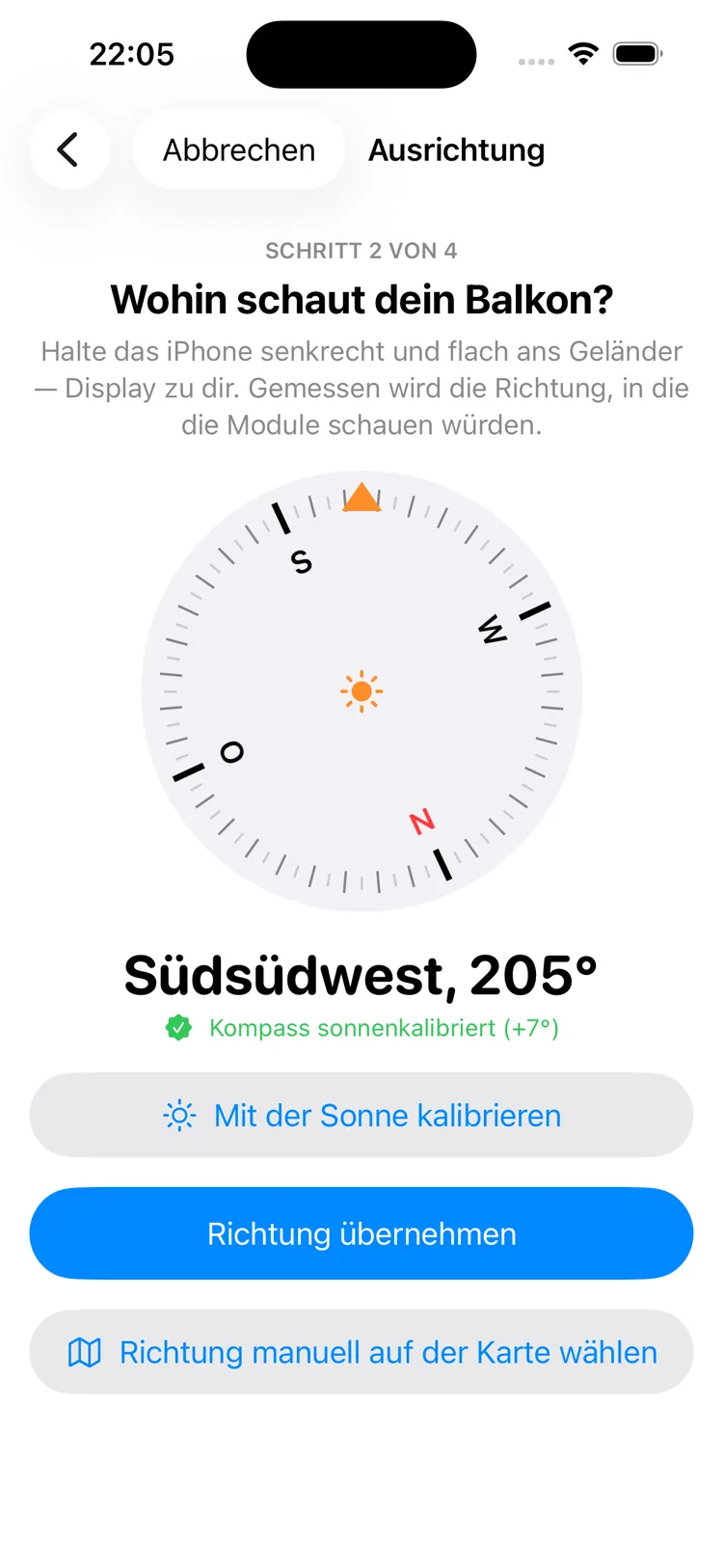
You take your iPhone out onto the balcony and work through four steps. Location via GPS or postal code. Orientation, by holding the iPhone flat against the railing — the app measures the direction the panels will later face, and names it in plain language: "south-southwest, 205°".
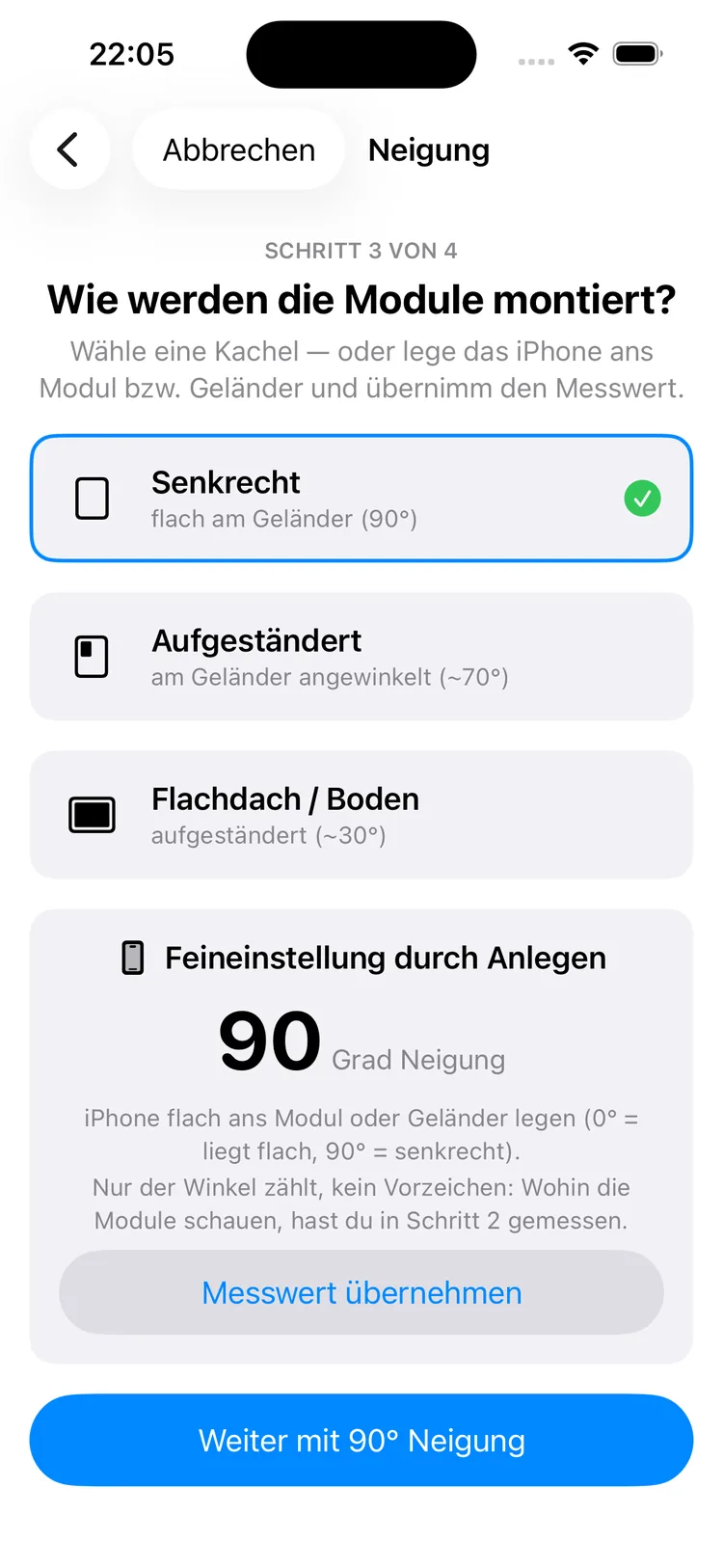
Tilt, by placing the iPhone against the panel or railing; three tiles cover the common cases, from vertical on the railing to raised on the ground.
And then the step no online calculator has: shading. You sweep the camera from east through south to west and tap the top edges of houses, trees and walls. Two lines run through the image as you do: the sun's path on the longest day and on the shortest. So you see directly what's in your way, and when.
After that comes the system — 880 watts for around €400 is preset — and three questions about your household. Then the result is ready: a traffic light with reasoning, the yearly yield in kilowatt-hours and the savings in the first year in euros. Coverage is limited to Germany, Austria and Switzerland.
How It Works
iPhone
1
Open it and step outside
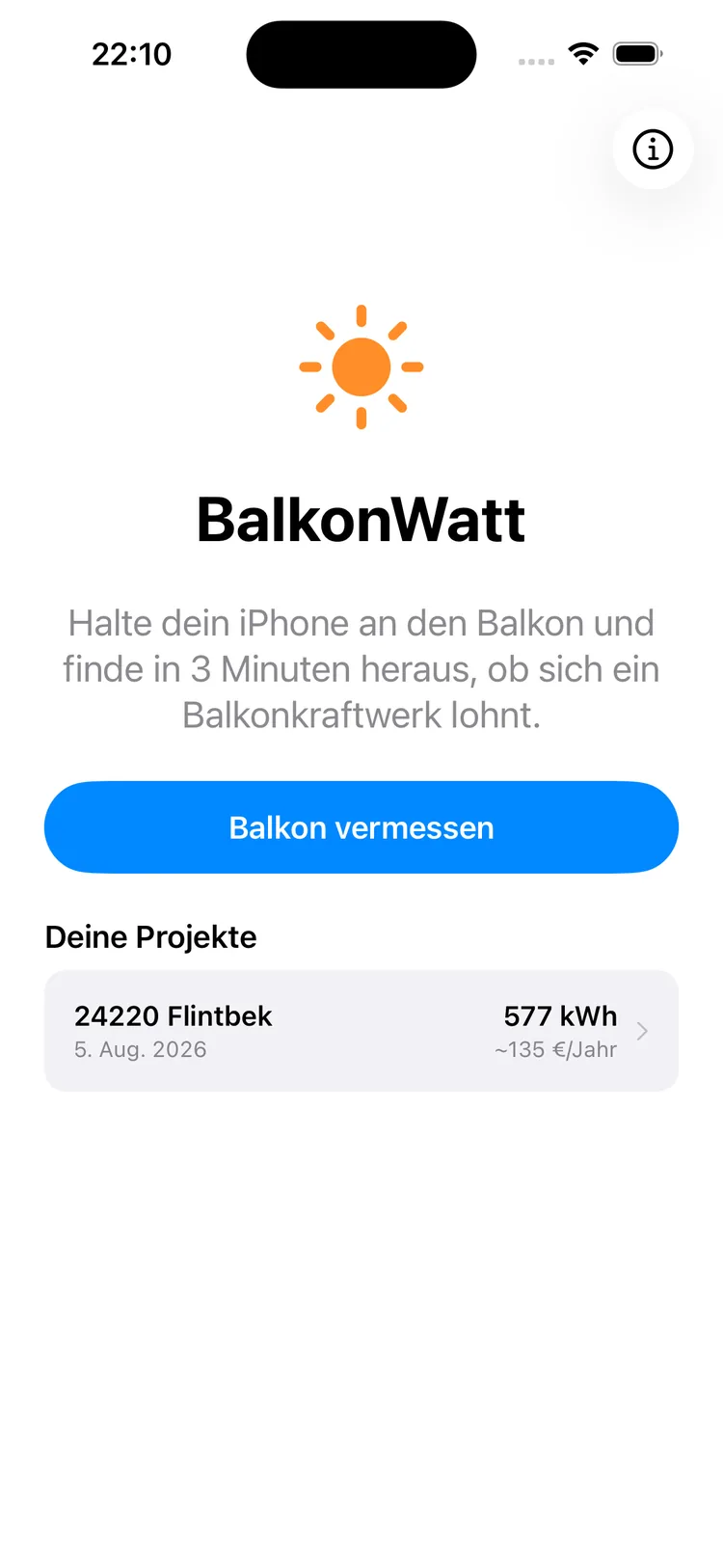
One button, that's all the home screen shows. No account, no setup — you tap "Measure Balcony" and you're in step one.
What you measure stays saved as a project, with location, date, yearly yield and savings. That makes it easy to compare variants later: a different balcony, a bigger system, a different angle.
iPhone
2
Which way does your balcony face?
Hold the iPhone upright and flat against the railing, screen facing you. What's measured is the direction the back is pointing — exactly the direction the panels will later face.
The compass rose tracks it live, with the direction shown below in words and in degrees. If a metal railing is in the way, calibrate with the sun beforehand; the green note then shows how many degrees were corrected.
iPhone
3
How are the panels mounted?
Three tiles for the common cases: flat against the railing, angled, or raised on the ground or a flat roof. One tap is enough.
If you want precision, place the iPhone against the panel and hold it still: the angle locks in on its own, and a tap you can feel confirms it. You choose which side of the iPhone faces the front of the panel — on the railing, display toward you is comfortable; on a flat panel it faces the ground. Only the angle matters here, no sign — which way the surface faces was already measured in the previous step.
iPhone
4
The answer in one sentence
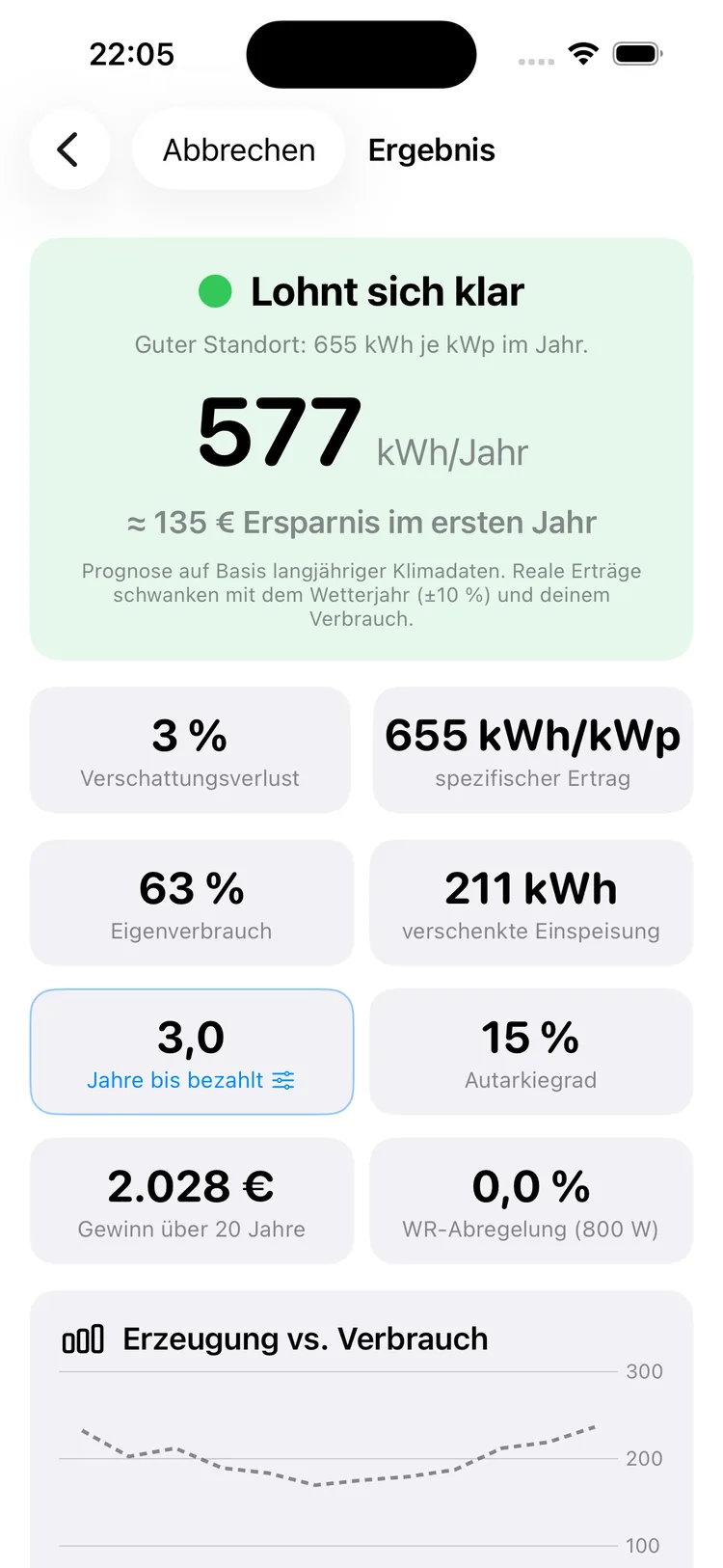
The traffic light with its reasoning sits at the top, with the yearly yield and first-year savings right below. Next to it is a note that this is a forecast and that real yields vary with the weather year.
Below that, the result is organized into sections with clear questions: Is it worth it? What does that mean exactly? How could you get more out of it? Is it worth paying extra? The most important answer is at the top, the evidence further down — shading loss, specific yield, self-consumption rate, wasted feed-in, and what the 800-watt limit actually costs you.
iPhone
5
And if the kit costs more?
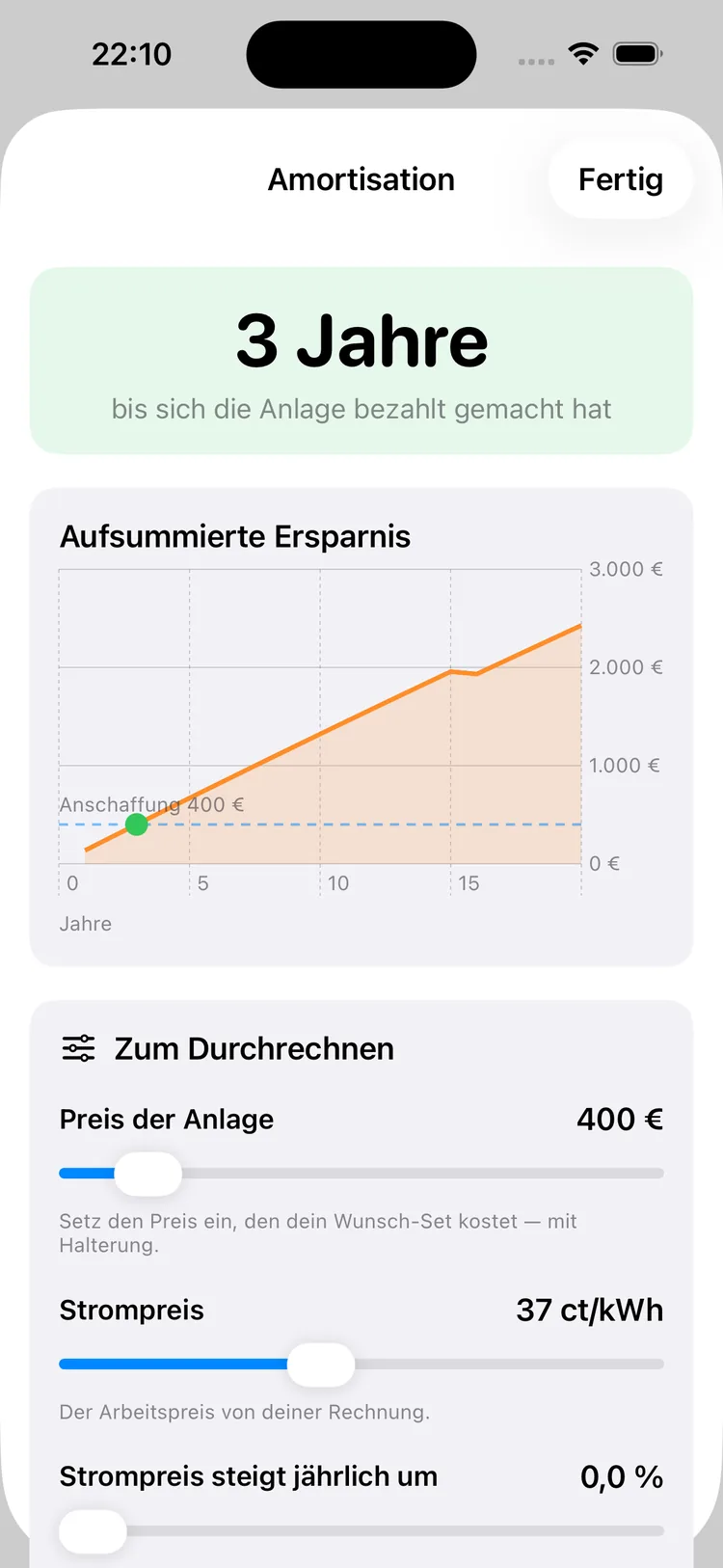
The payback calculator shows accumulated savings as a curve, with the point where they exceed the purchase price.
Three sliders turn it into a tool: the price of the kit you have your eye on, your rate from the electricity bill, and a possible rise in electricity prices. The latter defaults to zero — a cautious assumption.
The images show sample data from a test measurement.
Why the Camera Is Enough
The most common question about the shading measurement is: how does the app know how far away the building across the way is? The answer: it doesn't need to know.
For shading, only the elevation angle counts. A ten-meter-high house ten meters away blocks exactly as much sky as a hundred-meter-high one a hundred meters away — both sit under 45 degrees. And that's precisely the angle the camera reads off when you tap the top edge.
The app splits the horizon into 36 sectors of ten degrees each and remembers how high something stands in each one. When calculating, it then checks for every point in time whether the sun sits above or behind the obstacle.
Because the camera image only serves as a viewfinder, no photo is taken or saved.
Sun Calibration
A metal balcony railing throws off the magnetic sensor in the iPhone — by double-digit degrees. Anyone who places the Compass app on the railing isn't measuring the true direction, but the true direction plus an unknown error. At twenty degrees off, the yearly yield is quickly off by five percent.
That's why BalkonWatt offers a second route: aim at the sun. Where the sun stands for your location and the current time can be calculated exactly, astronomically. The difference between the calculated and measured value is the compass's error — the app remembers it and corrects for it in every measurement from then on.
On a Balcony, Winter Decides
On a roof, panels sit at an angle and collect the most in summer. On a railing, they hang vertically — and that flips things around: the low winter sun hits a vertical surface far more favorably than the high summer sun, which mostly skims past it.
That leads to the point rule-of-thumb calculators miss: shading weighs heavier on a balcony than on a roof. In winter, the sun sits so low that a neighboring building with a 25-degree elevation angle can block it out completely for hours — in exactly the season when vertical panels would otherwise be delivering.
That's precisely why the shading measurement is the core of this app, not an extra.
One Direction or Two?
On a corner balcony or an east-west balcony, one question comes up that no rule of thumb answers: all panels facing the highest-yield direction, or split across two sides? If you measure two panel surfaces, BalkonWatt Pro gives you a real recommendation — based on full-year calculations for every layout, compared in euros, each line showing the difference from your current setup.
Below that are the daily curves with your electricity consumption. Only what falls under that line is money you actually save; the rest goes to the grid unpaid. That is exactly what shows why two directions can deliver more than the highest-yield position alone.
You measure the second panel the same way as the first, direction first, then tilt — and for the second side, too, the app asks whether anything is above it. On a corner balcony, often only one side sits under the neighbor's balcony.
A suggested position can be applied and taken back at any time; your measurement stays saved and is shown alongside. And with the live aligner, also part of Pro, you hold the iPhone in the planned plane and instantly see what it would produce in a year.
Where the Numbers Come From
Calculations use the radiation data from PVGIS, the Photovoltaic Geographical Information System of the European Commission. That's a long-term climatology — the average course over many years, not a weather forecast.
This data is stored as a grid in the app: 0.1-degree resolution, roughly eleven kilometers per cell, with twelve monthly values for global radiation, diffuse fraction and air temperature. That's why the calculation works without a network — and why there's no server request when you take a measurement.
From these monthly values, the app builds daily profiles in 15-minute steps, calculates the sun's position for your location, overlays your measured horizon, and works out what reaches your tilted surface. Panel temperature and efficiency curve are factored in as well.
Radiation data: PVGIS © European Union, CM SAF SARAH-3, provided under the CC BY 4.0 license. The app is neither checked, endorsed nor authorized by the European Commission or PVGIS.
The calculation engine was checked against two independent references: 300 cases against the official PVGIS calculator — 20 locations, 5 orientations, 3 tilt angles — and 18 cases for self-consumption against the plug-in solar simulator from HTW Berlin. Both checks stayed within the tolerance set in advance. HTW Berlin has no connection to the app; its simulator served as a benchmark.
What the Traffic Light Means
At the end there's no wall of numbers, just one sentence. Behind it sit fixed rules:
| Traffic light | Condition |
|---|
| Clearly worth it | pays off within 8 years, at least 550 kWh per kWp |
| Worth it with caveats | pays off within 15 years |
| Probably not worth it | longer — or not at all |
The reasoning always sits right beside it, such as "Good location: 655 kWh per kWp per year". That way, why the color turns out the way it does stays traceable.
For Context: Typical Values
What orientation and shading actually amount to shows up best in numbers. All values for Berlin, 880 Wp, vertical on the railing, clear sky:
| Orientation | Yield per kWp |
|---|
| South | 744 kWh |
| Southwest | 683 kWh |
| East | 520 kWh |
| West | 514 kWh |
| Northwest | 333 kWh |
| North | 249 kWh |
And what shading does to it — the same south-facing balcony, with a horizon all around:
| Horizon all around | Yield per kWp |
|---|
| clear | 744 kWh |
| 20° | 586 kWh |
| 30° | 443 kWh |
| 40° | 302 kWh |
| 50° | 159 kWh |
A south-facing balcony with a 40-degree horizon delivers less than a clear northwest-facing one. That's why a rule of thumb based on orientation alone gets it wrong so often — and why measuring makes the difference.
Payback, Battery, Tilt
When it pays off
The payback calculator shows accumulated savings over twenty years as a curve. Three sliders — system price, electricity price and electricity price increase — turn it into a tool for the actual offer sitting in your cart right now.
The twenty-year balance factors in replacement costs: an inverter after 15 years, a battery after 10, each at 75 percent of its price. That makes the number smaller — and more honest.
Is a battery worth it
A battery doesn't generate electricity, it shifts it from midday into the evening. At 800 watts of output, the surplus is small, so the curve already flattens out at around one kilowatt-hour. The battery calculator shows it across every size — and says "probably not" when that's the case.
How far to raise it
The tilt optimizer calculates the yield across every angle from 0 to 90 degrees in two-degree steps and names the optimum for your balcony. That answers whether a mount with an adjustable angle is worth it at all.
What to Do After You Decide
If you decide in favor of a system, the app summarizes the next steps. For Germany, there are essentially three:
- Register in the Marktstammdatenregister, the Federal Network Agency's market master data register — mandatory, free, through a simplified form for plug-in solar. A separate notification to the grid operator has no longer been required since 2024.
- Inform your landlord or homeowners' association. Since October 2024, plug-in solar counts as a privileged structural change. The app generates a ready-made letter for this as a PDF.
- Check your meter. Old meters with a spinning disc must not run backward; the grid operator swaps them out for free.
The landlord letter is a wording aid and does not replace legal advice. Check the current technical and legal requirements before buying and installing. The app has no connection to the Federal Network Agency.
What Sets This App Apart
Measured, not estimated
Orientation, tilt and shading are captured right where the system will hang — with compass, tilt sensor and camera. No form asks for numbers you'd otherwise have to guess.
Shading is actually captured
The point where the app differs from every online calculator: houses, trees and walls are recorded sector by sector, with the summer and winter sun paths live in the camera view.
Calculates on the device
The solar data lives inside the app. The measurement works even without signal — and nobody has to wait for a server response.
Says no, too
If your location falls outside the data area, the app says so instead of making up a number. The battery check advises against it when a battery brings little benefit. And the twenty-year balance subtracts replacement costs.
Built for outdoors
Large buttons, little text, no typing required — the app is meant to be used standing at the railing, not at a desk. Feedback is tangible: when placing an obstacle, on successful calibration, and when the result is ready.
What It Costs
The measurement and the answer to the actual question are free: all four measurement steps, the traffic light with reasoning, the yearly yield, first-year savings, shading loss, specific yield, saved projects and sharing the result.
| BalkonWatt Pro | Price |
|---|
| One-time purchase, no subscription | €5.99 |
Pro unlocks: payback period and payback calculator with curve and three sliders, self-consumption rate, wasted feed-in, self-sufficiency rate, the 20-year balance, curtailment from the 800-watt limit, the monthly comparison of generation and consumption, the tilt optimizer, the battery calculator, the recommendation for two panel directions, the live aligner, the measurement report and the landlord letter as a PDF, plus the yield widget for your home screen.
The purchase applies to every member of your Family Sharing group and can be reclaimed on additional devices with the same Apple ID via "Restore Purchases".
What This App Is Not For
It doesn't measure ongoing yield. There's no connection to an inverter or an existing system — the app calculates in advance, it doesn't monitor.
It doesn't recommend products. No database of kits, no manufacturer names, no purchase recommendation and no affiliate links.
It's not for roof-mounted systems. The model and validation target plug-in solar devices under the 800-watt limit; input goes up to 4 kWp.
Coverage is limited to Germany, Austria and Switzerland. Outside that area, it says so openly.
The app runs exclusively on iPhone from iOS 17 — it needs a compass, tilt sensor and camera in one device you can hold up to a railing. That's why it isn't available for iPad, Apple Watch or Mac. Available in German and English.
All yield, savings and payback figures are simulation results based on long-term climate data and your measurement. Real-world yields vary with the weather year — typically ±10% — and can differ due to on-site conditions. The figures are a decision aid, not a guarantee. BalkonWatt uses the sensors of a regular iPhone and is not a calibrated measuring instrument; it does not replace professional planning.
Your Data Stays on Your iPhone
Compass and tilt values, the camera image and all measurements stay on your device. The camera image only serves as a viewfinder — no photo is taken or saved. Saved projects also stay only there; delete the app, and they're gone.
The app uses your location to pick the matching solar data; it is not sent to us. The place name shown in the app comes from Apple's map service — based on your location or on your search by postal code or place. Purchases are handled by Apple. Details are in the Privacy Policy.
Radiation data: PVGIS © European Union, CM SAF SARAH-3 (CC BY 4.0). Apple, iPhone, iPad, iOS, Apple Watch and App Store are trademarks of Apple Inc., registered in the U.S. and other countries. BalkonWatt is independently developed and has no connection to Apple Inc., the European Commission, PVGIS, HTW Berlin or the Federal Network Agency.