Home·Apps·BrockGym for Android
A workout tracker records what happened. This one works out what to start with next time — and only suggests weights you can actually load on your equipment.
The app tells you what's up today
You're at the machine, you open the exercise — and you see not just what you did last time, but what weight is due now. The app works it out using double progression: reps go up first, to the top of your target range, then the weight.
It knows your equipment. A gym increases in 2.5 kg steps, your dumbbells at home in 2 kg steps — the suggestion adapts to whichever location you're training at.
You log set by set, with a tap — a workout tracker that keeps pace with you on the gym floor. The rest timer runs between sets, and the next suggestion is already waiting when it ends.
What a notebook leaves out, the app calculates alongside everything else: how many hard sets each muscle has gotten this week. That's the number muscle growth actually depends on — including the sets where your biceps helped out during rows.
If you don't know an exercise, it's in the library: 293 exercises with instructions, target muscle and execution.
How it works
1
The app tells you what's up today
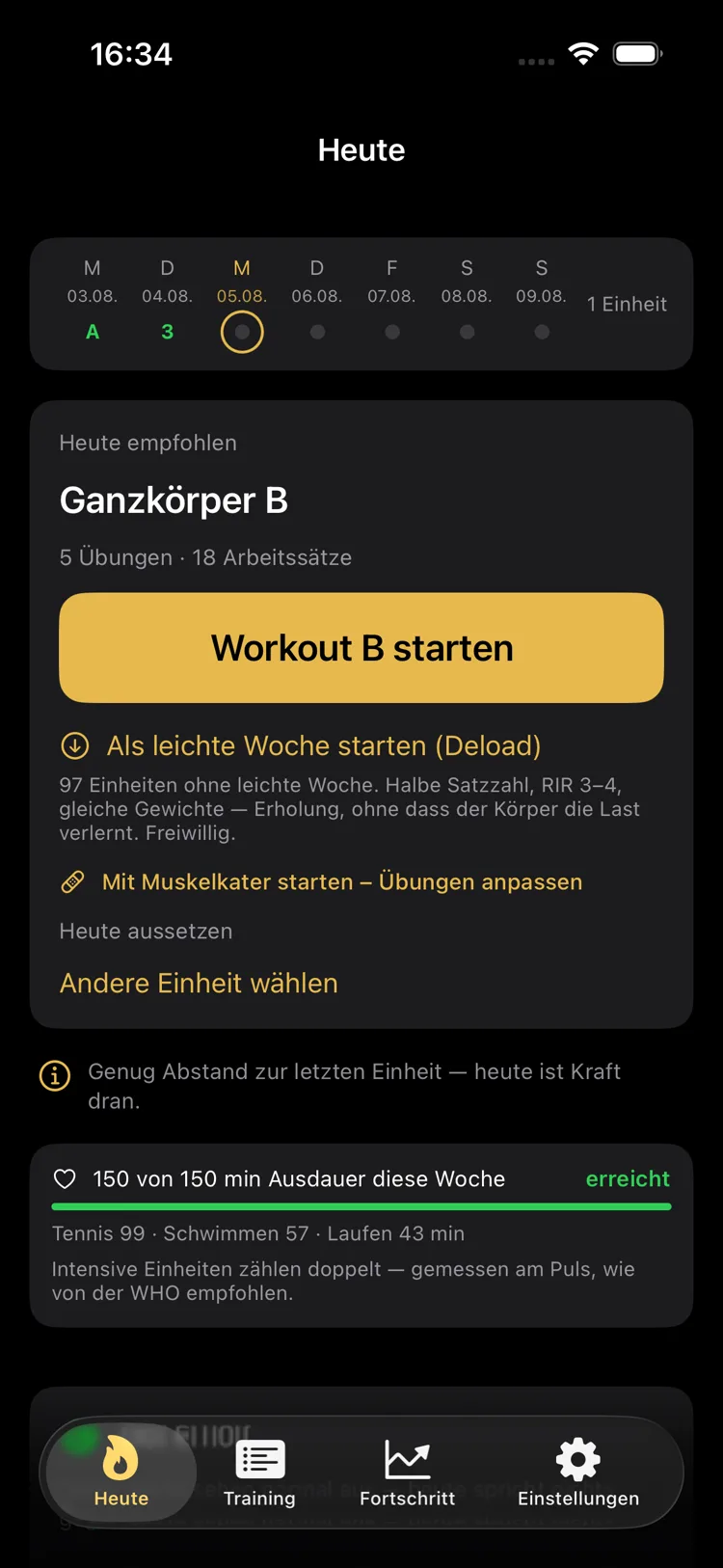
The "Today" tab shows the week at the top, and below it what will help most right now — strength, endurance or rest — each with a sentence explaining why. Below that is how many endurance minutes you've already logged this week.
Instead of just working through a plan, you also see the alternatives: start a light week, begin with sore muscles and have exercises adjusted, or skip today.
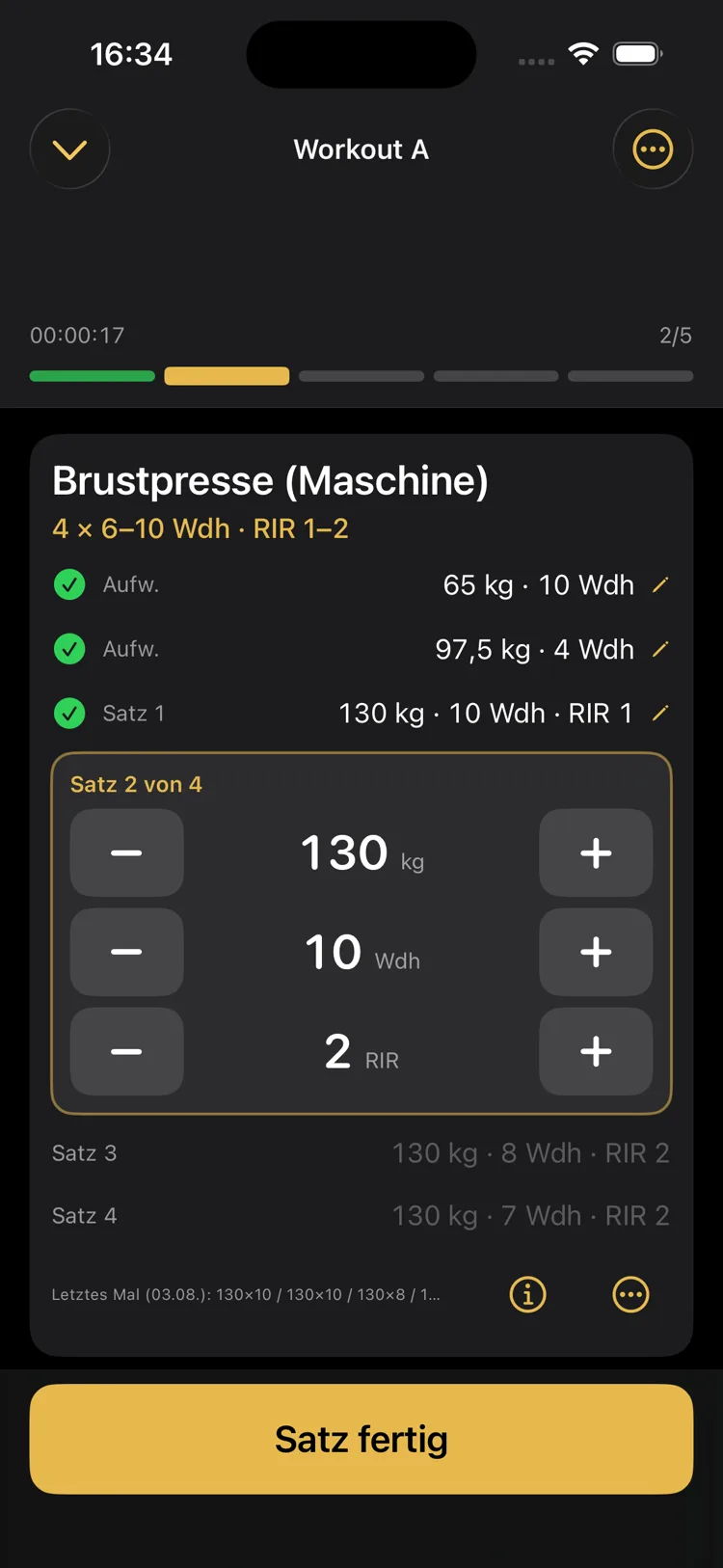
During a workout, you see at the top which exercise you're in and how far along the session is. In the middle is the exercise's target — say 4 × 6–10 reps · RIR 1–2 — below that the sets you've completed and the active set with three rows: weight, reps, RIR.
Everything runs through big plus and minus buttons, not the keyboard. At the very bottom, a single line shows what happened last time. Tapping "Set done" saves immediately — not just at the end — and starts the rest timer.
3
Every exercise has its own curve
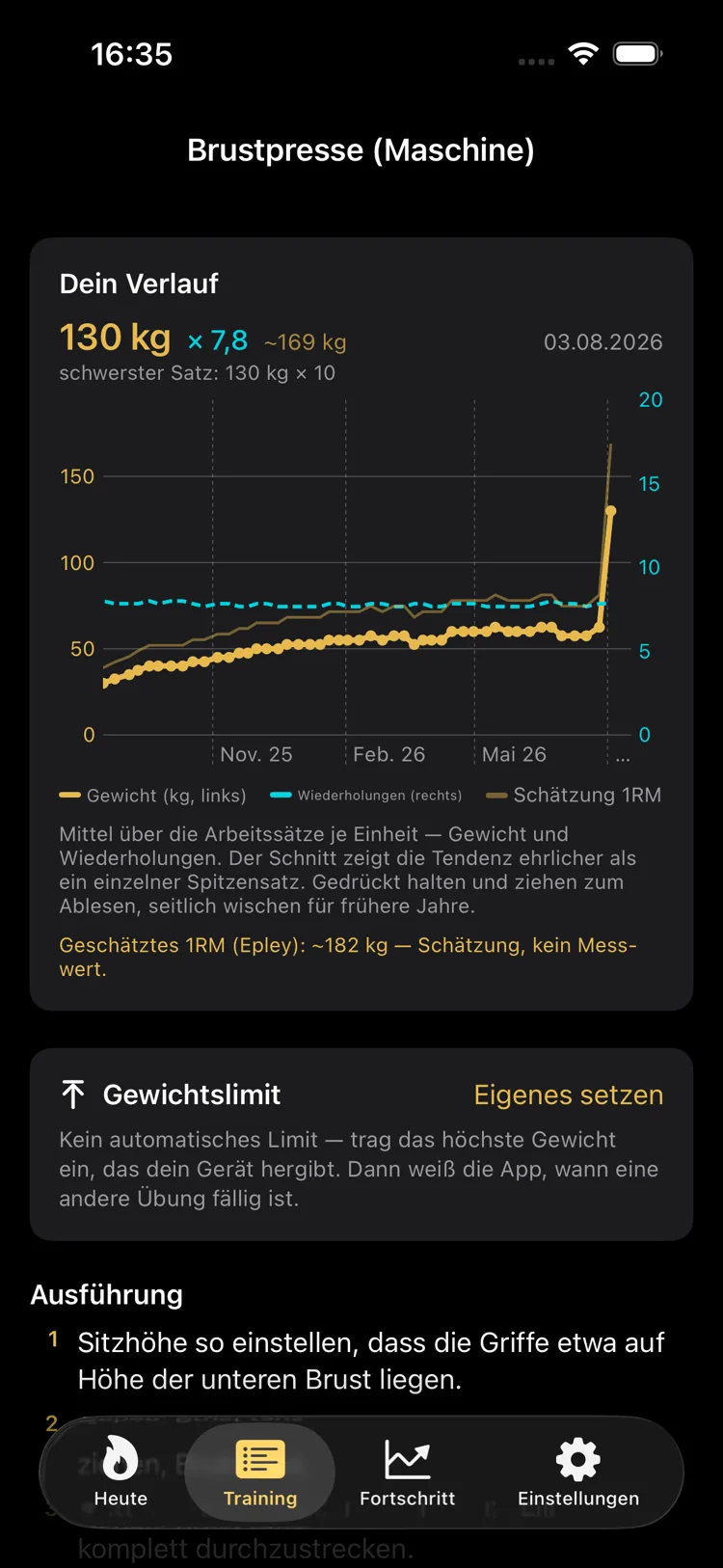
Every exercise comes with a history spanning months: average working weight, reps and estimated one-rep max. It's calculated from the average of your working sets, not from your one best set — that shows the real trend more honestly.
Below that, you can set a weight limit if the machine runs out of room at the top, and look up the exercise's execution.
4
Volume per muscle — the number no notebook has
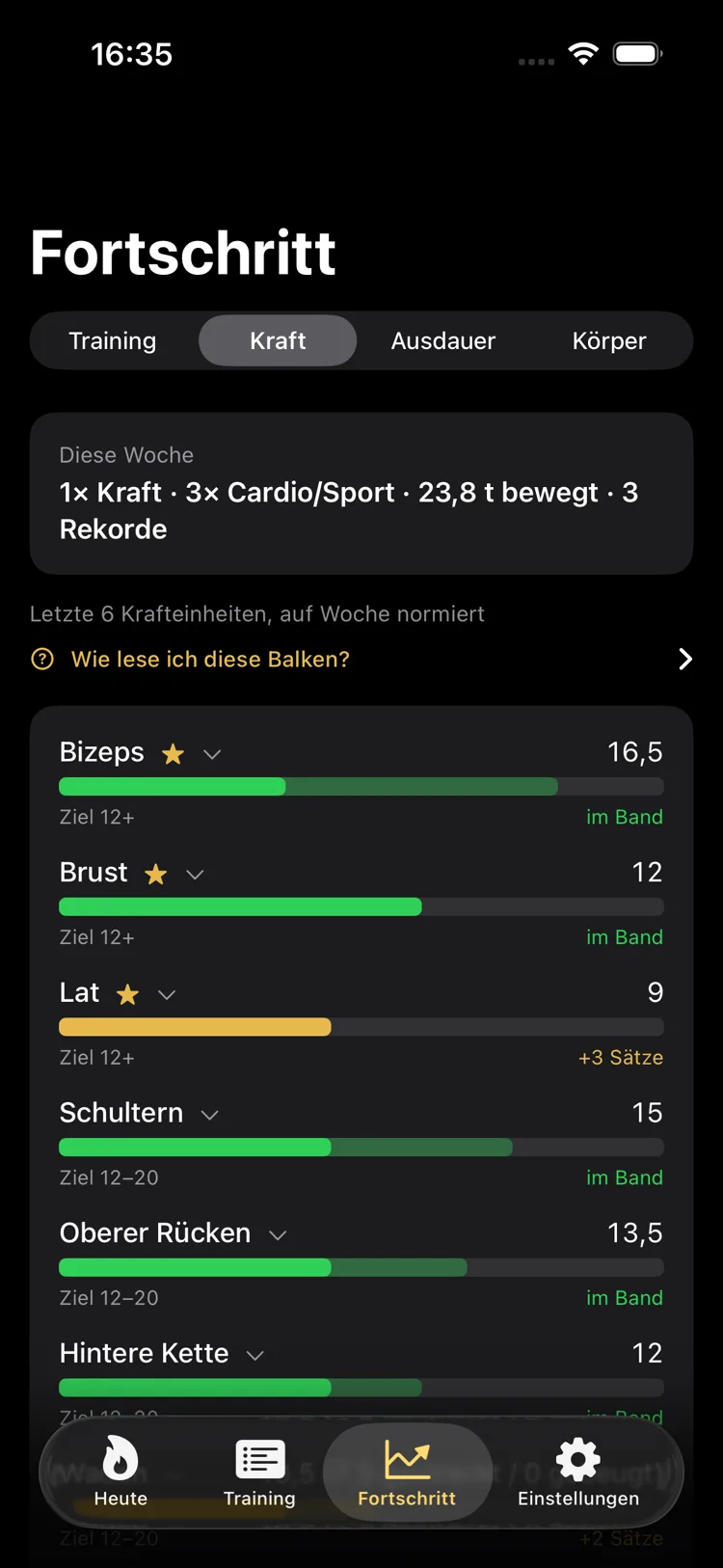
The "Strength" section shows a bar for every muscle against its target range. Green means: within range. If it shows +3 sets, something's missing — and it's an exact number, not a feeling.
Secondary muscles are counted proportionally, so rows don't pretend your biceps got nothing out of it.
5
And the view over everything
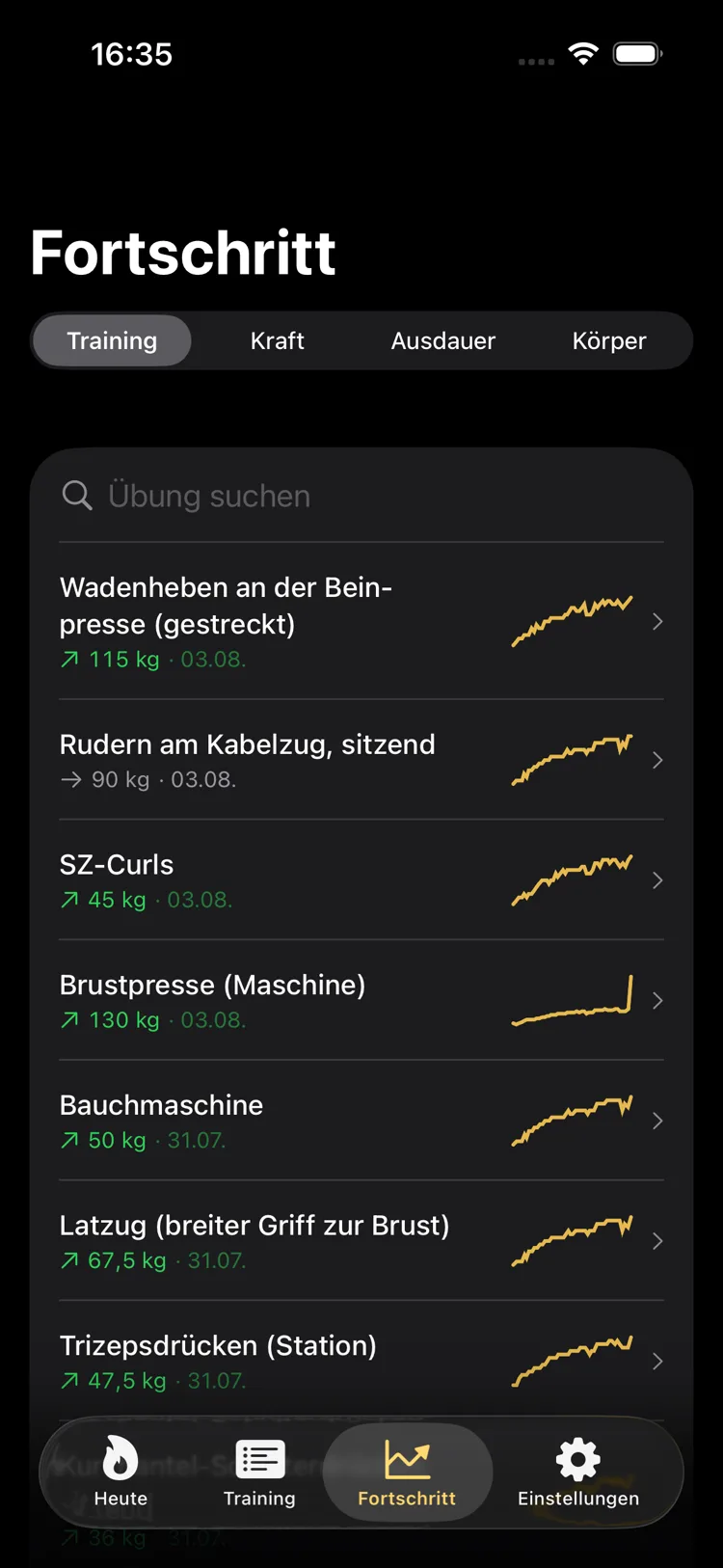
Under "Training", every exercise sits with its progress at a glance: current working weight, date of the last session and a small trend curve. The arrow shows whether things last moved up or sideways.
All numbers in these images are generated sample data, not real training results.
How the app calculates
Progression: clean reps first, then heavier
BrockGym works with double progression. The weight only goes up once you cleanly hit the top of your rep range — not because four weeks have passed. How big the jump is depends on what's actually loadable on that piece of equipment.
Volume: fractional sets instead of gut feeling
An exercise's primary muscle gets credited a full set, every secondary muscle gets half. Only completed working sets with RIR up to 3 count — warm-up sets never do. The target range sits at 12 to 20 sets per muscle per week; for triceps it starts at 8, because they're involved in every pressing movement.
It's calculated over your last six strength sessions, projected onto one week — deliberately not by calendar week. Otherwise a plan alternating between A and B workouts would falsely report missing sets every other week.
Stagnation and deload
The app spots a plateau by looking at an exercise's most recent sessions, with different thresholds for machines and isolation exercises. After an increase, a grace period applies before it's checked again — otherwise, every increase would immediately look suspicious.
The app suggests a light week after 18 to 24 completed sessions: half the set count, RIR 3 to 4, the same weights. Recovery, without your body unlearning the load. It's optional.
Important: all counters run in completed sessions, never in calendar weeks. If a workout gets skipped, the next session is simply the one that was next in line.
Estimated one-rep max
The 1RM is estimated using the Epley formula — weight times one plus reps divided by 30 — with RIR factored in: a set with 2 RIR counts as roughly two additional possible reps. Above twelve effective reps, the app doesn't show a value at all, because the formula becomes unreliable there. Everywhere it appears, it's labeled as an estimate, not a measured value.
Heart rate zones and endurance
Endurance isn't prescribed, but it is evaluated. You time a session yourself with the in-app stopwatch, or it comes from Health Connect, along with heart rate, distance and calories from the watch or app that recorded it. The basis is the weekly goal of 150 minutes, as recommended by the World Health Organization for moderate exercise. What counts is based on effort, not the stopwatch:
| Zone | Share of max heart rate | Counts as |
|---|
| 1 — Very light | 50–60% | half time |
| 2 — Base | 60–70% | 1:1 |
| 3 — Moderate | 70–80% | 1:1 |
| 4 — Hard | 80–90% | double |
| 5 — Maximal | 90–100% | double |
So a hard session can credit you more minutes than the clock actually measured. If there's no heart rate data, time counts one to one. Max heart rate comes from the rule-of-thumb formula 220 minus age — explicitly labeled in the app as a rule of thumb, not a measured value.
With Pro, every endurance and strength session for which Health Connect provides heart rate data shows the heart rate curve and the time per heart rate zone. The “Endurance” section under Progress sums up sessions, time, kilometers and calories month by month, plus time per zone when heart rate data is available, and shows your endurance records per sport. Without heart rate data, a session is never classified as hard — rating a session by duration alone would be a guess.
If strength and endurance are both due the same day, the recommendation is: strength first. Endurance right before it measurably costs strength performance.
Why this app
It knows your equipment
For every training location, you record which dumbbells, bars, plates and machines are available — and in what increments they adjust, right down to the individual machine. A leg press moves in 5 kg steps, a triceps station in 2.5 kg steps. From then on, the app never suggests a weight you can't load there. When you switch locations, it converts every weight to what's loadable at the new one.
It pre-fills your next session itself
By your second time doing the same exercise, weight, reps and RIR are already filled in — calculated from what you achieved last time. You don't have to look anything up.
It doesn't make up numbers
The estimated one-rep max is left out above twelve reps instead of being shown with false precision, and it's always labeled as an estimate. Distance, calories and heart rate only appear where a watch or app actually measured them. And where the data is too thin, the app stays quiet.
Everything comes with a reason
Every recommendation comes with a sentence explaining why. If you want to know why it's a strength day instead of an endurance day, you get an answer instead of just an icon.
What's included
Free forever, with no time limit:
- Set-by-set logging with weight, reps and RIR, saved after every single set
- A rest timer with a notification when the rest is over
- Warm-up sets and superset pairs; skip, swap or add your own exercises
- Custom workouts, a plan editor and a plan generator that asks about training days, goal and available equipment
- 293 exercises with instructions and, for nearly every exercise, images of the start and end position, filtered by your equipment
- Complete history with a weekly streak; correct sessions afterwards
- Time endurance sessions yourself with the in-app stopwatch, with a list and a detail view of every session
- Data from Health Connect, if you allow it, read-only: weight, workouts, heart rate, distance and active calories. Import the last 7 or 30 days once; after that, the app syncs the last 14 days whenever you open it
- Log your morning weight on the Today page or take it from Health Connect
- A weekly endurance bar on the Today page
- Time off for illness and injury, rest days
- CSV export of all sessions as a file
- A way to get in touch with suggestions and bug reports
With BrockGym Pro, the analytics are added:
- Volume per muscle, history and best result for every exercise, records
- Weight suggestions: the app works out what to start with next time after every session, and tells you when it's time to increase
- Endurance and heart rate: heart rate curve and time per zone for every session with heart rate data, endurance month by month and endurance records
- Body: morning weight with a smoothed trend and body measurements
- Unlimited training locations
What it costs
The core features are free forever: train without limits, log sets, use the rest timer, browse the exercise database, edit plans, view your complete history and export it.
| BrockGym Pro | Price |
|---|
| Monthly | €2.99 |
| Yearly | €19.99 |
| Forever (one-time) | €49.99 |
Monthly and yearly subscriptions renew automatically until you cancel. Billing runs through Google Play and your Google account; you can cancel any time in the Play Store app under “Payments & subscriptions” → “Subscriptions” or in the app via “Manage subscription”, before the current period ends. "Forever" is a one-time purchase and doesn't renew. Purchases can be restored and apply across all Android devices with the same Google account. The Terms of Use and Privacy Policy apply.
What this app is not for
No food logging. No meal database, no barcode scanner. The app shows target values and a calorie recommendation based on your weight trend — nothing more. That's a decision, not a gap.
No motion analysis. The app doesn't detect anything through the camera and doesn't count reps automatically. You log them yourself.
No friends feed, no leaderboards, no sharing to social networks. Also by design. For your own data, there's the CSV export.
There are also no running plans — endurance is evaluated, not prescribed —, no light mode, and no version for tablets, watches or computers. The app runs on Android phones from Android 8; data from Health Connect needs the Health Connect app, which is built in from Android 14; the interface is available in German, English, Spanish, French and Dutch.
BrockGym gives training recommendations, not medical advice. If you're in pain, have a pre-existing condition, or are recovering from an injury, that question belongs with a doctor, not an app.
The app doesn't measure heart rate, distance or calories burned itself; they come from Health Connect, and therefore from whichever device recorded them. Max heart rate is a rule of thumb, the estimated 1RM an estimate. The target range of 12 to 20 sets is a range drawn from group averages, not a hard limit below which nothing happens.
Android, Google Play and Health Connect are trademarks of Google LLC. BrockGym is developed independently and is not affiliated with Google LLC.