Home·Apps·Heimblick·Android
Heimblick is also coming to Android, with the same features as on iPhone. The app combines every number around your home into one: what it costs you each month. Property tax, wastewater, insurance, energy and the payment on your mortgage come together in one place — and the app separates what's actually spent from what you'll own afterward. Everything in detail, with worked examples, is on the main page of the app.
What Your Home Costs Each Month
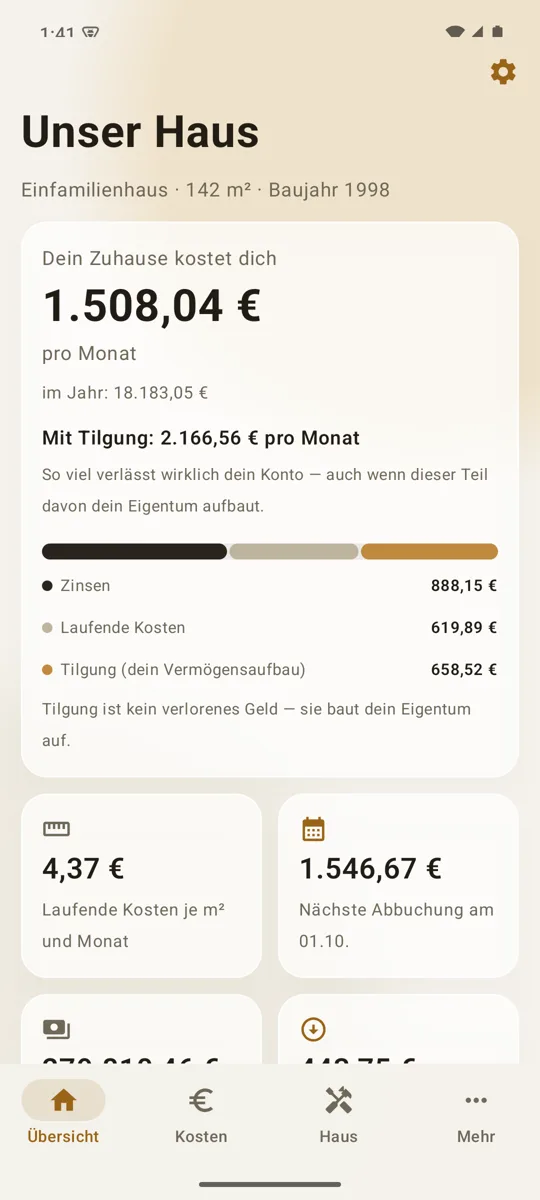
At the top of the overview is one sentence: Your home costs you — followed by the amount per month, with the yearly figure below. That number includes your running costs and the interest on your loan.
Principal repayment sits next to it, not inside it. It does leave your account every month, but it builds your equity. That's why Heimblick shows two figures: what your home costs you and what actually gets debited including repayment. A bar splits the total into interest, running costs and repayment.
| Item | Counts as |
|---|
| Running costs such as property tax, insurance, electricity and heating | Cost |
| Interest on the loan | Cost |
| Principal repayment | Equity |
| Recommended maintenance reserve | Note |
For free, the overview shows the total of your running costs per month and year and the next debits. Loans, the split and the other tiles are part of Heimblick Plus.
Running Costs and the Debit Calendar
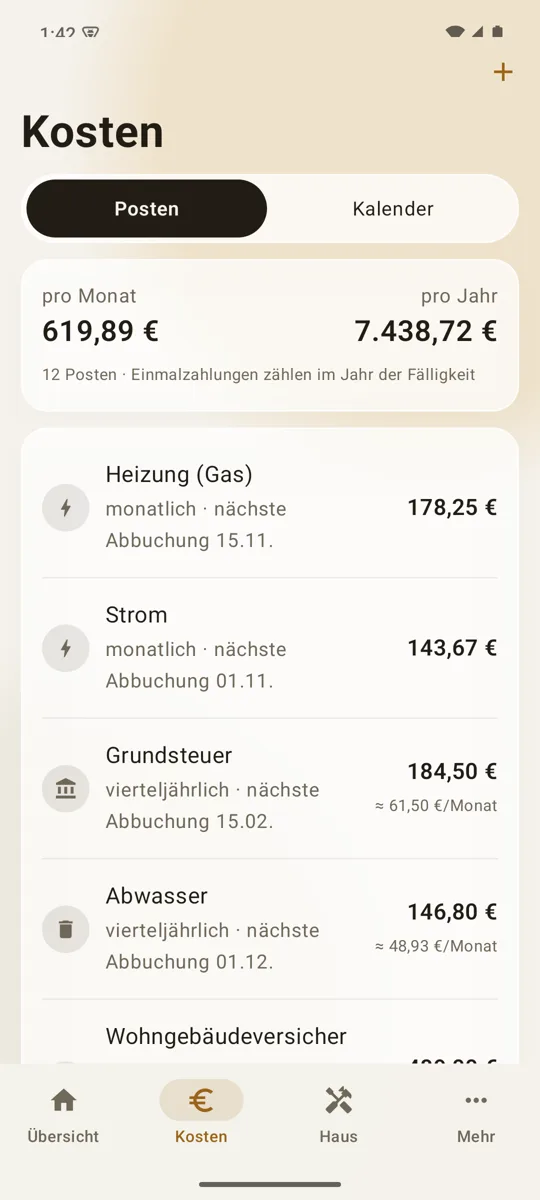
To get started there are 33 templates, from property tax to chimney sweep. Each item has an amount, an interval and the next debit date — monthly, quarterly, semiannual, yearly or one-time. Quarterly and semiannual amounts are also converted to a monthly figure.
With Plus, the debit calendar shows what leaves your account over the next twelve months, including your loan payments. If a date falls on a weekend or a holiday, the app names the day banks usually post the debit.
Your Financing, Worked Out
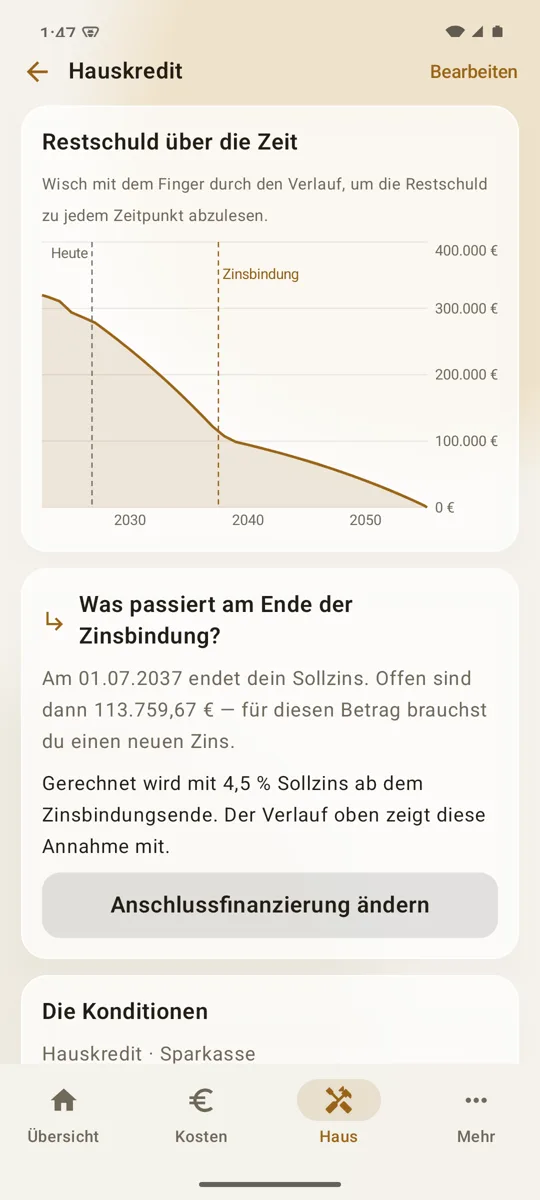
With Heimblick Plus, you work through one or more annuity loans: monthly payment, today's remaining balance and the complete amortization schedule, year by year. The curve shows the remaining balance over the full term; run your finger along it to read any point.
- Extra repayments, one-time or every year. The remaining balance drops right away, and the following payments are calculated from the new balance.
- Play through follow-up financing: you enter an assumed interest rate, and the amortization schedule continues with it from the end of the fixed-rate period.
- A timely reminder: if you like, Heimblick creates an appointment two years before the fixed-rate period ends.
Calculations are done in cents with commercial rounding. The results are a calculation based on what you enter; your bank's documents are what count.
Repairs, Renovations, Receipts
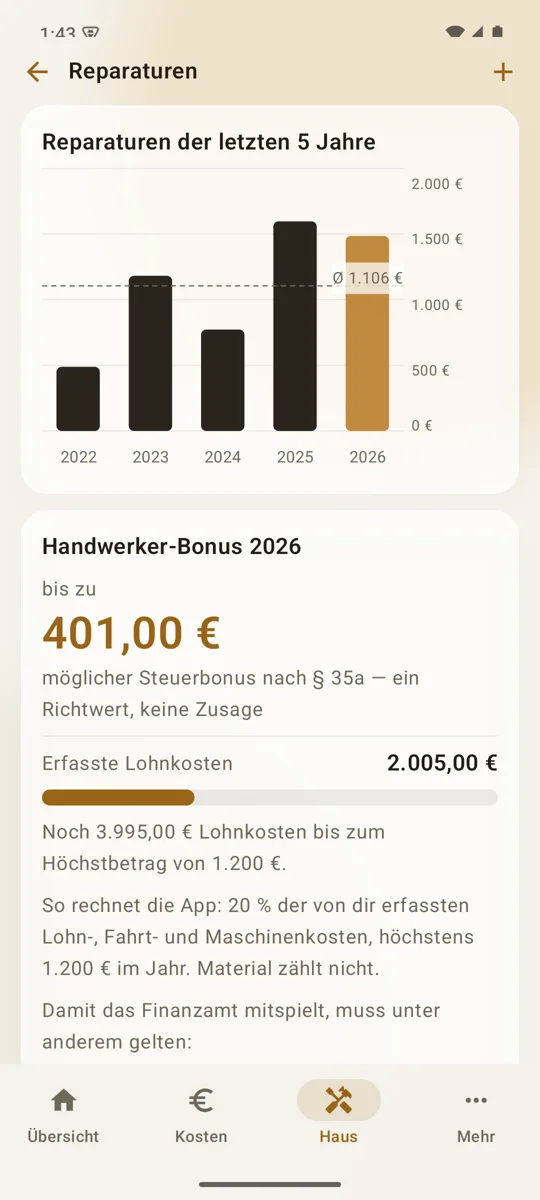
Heimblick keeps repairs and renovations apart: repairs maintain your home, renovations add value and get their own total. You can attach a receipt to every entry — take a photo of the invoice or attach a PDF.
If you note how much of an invoice was labor, Heimblick calculates a guideline figure for the tradesperson tax credit under Section 35a of the German Income Tax Act: 20% of the labor, travel and machine costs you've entered, up to €1,200 a year. Materials don't count.
The tradesperson tax credit is a guideline, not a promise. Heimblick doesn't provide tax advice and doesn't review your individual case. Whether and to what extent the amount is accepted is decided by the tax office.
Value, Reserve and Buy or Rent
With Plus, you enter what your home is worth by your own estimate. Heimblick subtracts the remaining loan balance and shows your equity in your home; each new estimate adds to a history. The app doesn't produce a formal valuation or an appraisal.
The recommended maintenance reserve follows the Peters formula: construction cost per square meter × 1.5 ÷ 80 × living space. At €2,000 per square meter and 120 m², that's €4,500 a year, or €375 a month. The recommendation isn't added to your monthly costs.
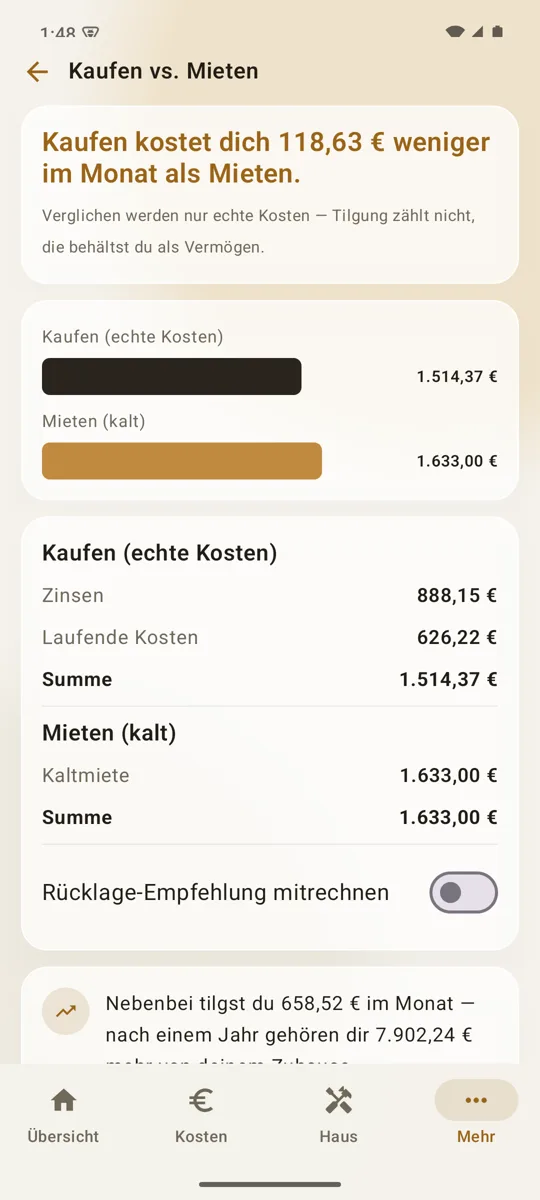
Buy or rent compares the net rent you save for your living space with your actual housing costs — running costs plus interest, without repayment. This deliberately simple comparison leaves out appreciation, an alternative investment and future rent increases.
Appointments and Deadlines
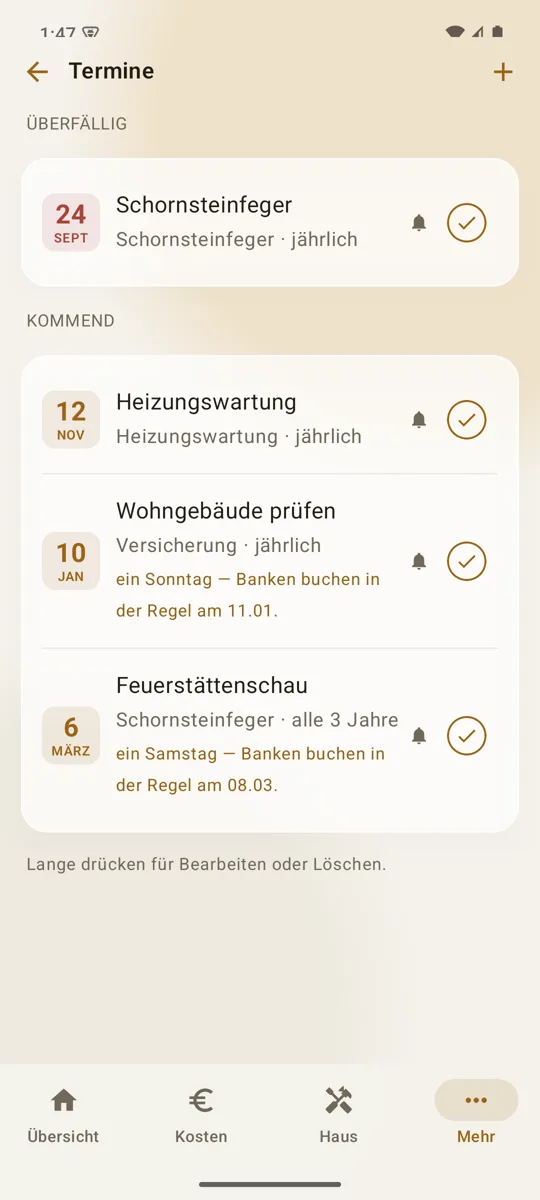
Chimney sweep, heating maintenance, an expiring insurance policy or warranty: you create appointments, recurring if you like, and Heimblick reminds you in good time with an Android notification. Appointments with reminders are part of Heimblick Plus.
Appearance, Backup and Export
Heimblick follows your device's light or dark mode or stays with one of them, and you choose the app's background color yourself. If Android backup is turned on in your Google account, Android backs up the app's data along with everything else. You can also export everything as JSON and CSV and share the files wherever you like.
What It Costs
Entering your data is free and stays free: setting up your home, as many cost items as you like with all templates, the overview with totals per month and year and the next debits, and repairs and renovations with receipts.
| Heimblick | Price |
|---|
| Download and enter data | €0 |
| Heimblick Plus, monthly subscription | €0.99 a month |
| Heimblick Plus, yearly subscription, first month free | €8.99 a year |
Plus unlocks the analyses: the debit calendar for twelve months, financing with amortization schedule, extra repayments and follow-up financing, the split into costs and building equity, the cost per square meter, the repair chart, value development, the recommended maintenance reserve, the buy-or-rent comparison and appointments with reminders.
Purchases and billing go through Google Play. The subscription renews automatically for the chosen period until you cancel; you cancel in the Play Store app under Payments & subscriptions › Subscriptions. When the subscription ends, everything you've entered stays visible and exportable; only the Plus sections lock again until you subscribe to Plus again. Prices on Google Play in Germany.
Requirements
Heimblick runs on Android phones with Android 8 or later, and the app is in German. Templates and notes follow the rules for homeownership in Germany. The app isn't tax, financial or real estate advice; all figures are based on your own input. Questions and suggestions: kontakt@brockdesign.de.
Legal notices for the Android app (in German): Privacy Policy · Terms of Use · Imprint